

Over the past couple of months, I decided it was time to give my old gaming PC a new purpose. These days, I rarely find time to game, so I’ve been looking for ways to get hands-on with something fresh—enter the world of self-hosting. With so much tech shifting to the cloud, I’m eager to see how much I can do on my own, just for the sheer challenge and the chance to learn something new. Of course, the added perk of keeping more control over my own data doesn’t hurt (and no, I’m not a tinfoil hat conspiracy theorist!). For me, it’s about getting curious, gaining new skills, and taking a bit more ownership in an increasingly invasive digital world.
The Setup So Far

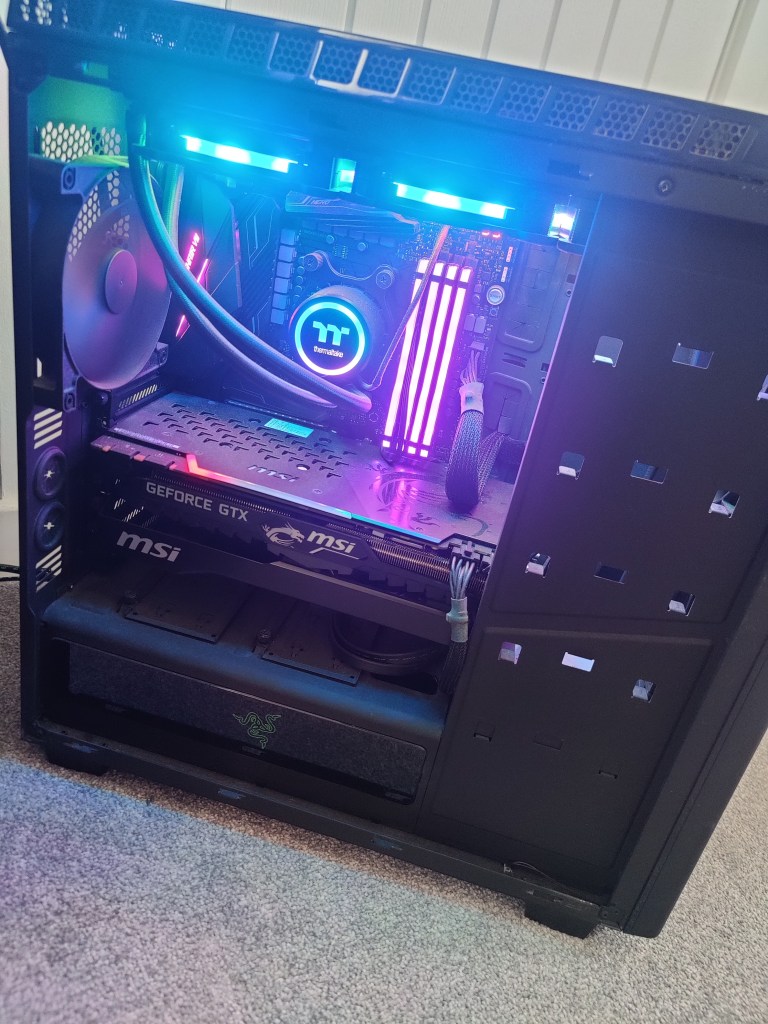
Right now, my homelab setup is simple but solid—a great foundation to build on. One of my first moves was ditching the default ISP router for a UniFi networking stack, mainly so I could finally create multiple VLANs and take advantage of built-in IDS/IPS security features. My network now consists of a UniFi Gateway Max, an 8-port Ultra 60W PoE switch, and two U6+ access points, which gives me robust wireless coverage and dedicated networks for personal devices, IoT gadgets, and guests. Everything feels so much more organized—and a lot more secure—since making the switch.
At the heart of my platform is a repurposed gaming PC, now doing duty as a Hyper-V server. It’s powered by an 8-core Ryzen 7 2700X, 32GB of RAM, a GTX 1080ti, and about 1.75TB of storage cobbled together from a 500GB NVMe SSD, a 1TB and a 500GB SATA SSD, plus a 1TB HDD. At the moment, it’s mainly running a single VM for Veeam backups, leaving me with plenty of room (and plans) for launching new projects. Alongside that, I’ve got a Home Assistant Green running my smart devices, and a Raspberry Pi 2 Model B that’s been collecting dust—just waiting for me to get more hands-on with Linux in the near future.
Where I’m Headed Next: Big Plans and New Experiments
So, where does all this leave me? In short, I want to see just how much I can self-host—and how far I can push my Home Assistant setup. There’s something rewarding about having full control and actually building out the digital tools I use every day.
Here’s what’s on my list:
- Build and configure a NAS: I’m aiming to create a reliable, expandable storage solution for all my files, backups, and media.
- Self-host my own cloud storage: Tools like NextCloud and Seafile are at the top of my list for keeping my documents, photos, and calendar in sync—without relying on the big clouds.
- Migrate my password manager: I’d like to move everything over to a self-hosted Bitwarden instance.
- Set up Plex or Jellyfin: Centralized media storage: each has its pros and cons and I’m not set on what one I’ll go with, but its high up on the list of priorties
- Create a VPN: Secure remote access (and the ability to safely share content with friends and family) is a must-have.
- Host my own website & try running an AI model: I want to try hosting my own site—and maybe experiment with my own locally hosted AI model
- Run my own email server
Home Automation

My interest in home automation has really taken off since discovering Home Assistant. Right now, I’ve got a growing pile of smart devices scattered around my house, each with its own app and login. One of the best things about Home Assistant is finally being able to control everything from a single dashboard—no more toggling between a dozen apps just to turn off the lights and lock the door. The platform’s flexibility is wild; I can even pull data from my car, and the potential for custom dashboards and automations is almost endless.
I’ve only just dipped a toe into this world, and so far I’ve got the integrations setup for my smart bulbs and air con unit. I’ve repurposed an old Galaxy Tab A that I’m using as a dedicated dashboard to manage these for the time being as a bit of a proof of concept. Once I’ve got a stable platform with more integrations setup, and had made some progress on a custom dashboard then I’ll look to upgrade this to something a bit more sleek. I’d like to get one for each floor too and have them wall mounted with either magnetic wireless chargers, or wired in if I can’t get that to work.
The Ultimate Smart Dashboard
One of my big goals is to design and build a dashboard that puts everything I care about front and center—true “mission control” for my home. Here’s what I want it to show and do:
- Live electric, gas, and water usage, with clear graphs
- Family calendar and running to-do list
- Weather forecasts and advance commute times (based on our phones’ locations)
- Controls for lighting, music, and smart speakers everywhere in the house
- Real-time feeds from my CCTV cameras
Building the Perfect Setup
My future plans include building a tidy rack to house all my networking gear, the NAS, and my Home Assistant Green—with room for a small display screen to monitor performance metrics in real time. On top of that, I’m planning a big “smart migration” for my house: upgrading to a smart meter, switching over to smart heating, and replacing all the lighting with gear that seamlessly integrates with Home Assistant. And, for a bit of fun, I’m also interested in building a magic mirror—something that would display the weather, calendar, and news while I brush my teeth.
As I work through these upgrades and projects, I’ll be documenting each step, sharing what I learn, and inviting you along for the ride. There’s plenty to build, break, and (hopefully) improve—so if you’re into homelabs, tech, or just enjoy a good experiment, stay tuned!
 The Life of J
Leave a comment