Author: Jack Chapman

  • Album Review – Joyner Lucas – ADHD 2

    Album Review – Joyner Lucas – ADHD 2

    Now, let me start this off with a bit of a disclaimer – This is just my opinion. I’m not a professional critic in any way shape or form. I’m just a dude who likes listening to music, and I like sharing my thoughts.  

    As a big fan of Joyner Lucas, his music has been on regular rotation for me over the past few years. Your Heart featuring J.Cole? Absolute banger. ISIS? Slaps. I was very excited when I heard a follow up was coming to the original ADHD album, so I decided it was the perfect time to revisit the project. 

    Joyner was one of the first artists I heard who really leaned into skits as part of his albums, and ADHD features five of them woven throughout. At first, I wasn’t sure what to make of it—I usually just zone out to music, not storytelling—but the skits actually became one of my favorite aspects. They add depth and flow to his work, shining a light on Joyner’s personal struggles with ADHD in a way that’s dark, humorous, and unfiltered. I found it relatable, especially remembering a similar lack of support in my own childhood. 

    Musically and lyrically, tracks like “ISIS,” “I Love,” “Devil’s Work,” “ADHD,” and “Will” are real standouts. The collaboration with Logic on “ISIS” is a highlight—I’m a big Logic fan, and their chemistry is great. I was also really impressed by “Will,” Joyner’s homage to Will Smith, with a music video that’s a work of art all on its own. 

    So, after thoroughly enjoying the original, I had high hopes for the sequel. ADHD 2 has been in the works for well over a year, and you can really sense Joyner’s commitment to pushing boundaries. He’s spoken about the creative freedom the ADHD series grants him, letting him experiment and flow across styles without being boxed into a single genre. With that in mind, I dove into the new album eager to see how he’d build on the foundation of the first—and I have to say, what I found was an even more expansive, personal, and versatile project. Let’s get into ADHD 2 and see how it stacks up. 

    Review

    Seven years is a long time to wait for a follow-up, but Joyner Lucas’s ADHD 2 is a return that justifies the anticipation. Balancing intense introspection with mainstream appeal, Joyner proves himself versatile, mixing storytelling and inventive flows with a stacked guest list that includes Ava Max, Snoop Dogg, T-Pain, Chris Brown, and more. The project effortlessly shifts between personal confessions and bold bangers, once again showing that Joyner’s at his best when he’s refusing to fit in any boxes. Is it better than the original? I think so. The emotional depth, paired with creative risks and well-chosen collaborations, make this a standout in his catalog—though a few tracks veer into repetition, the overall album arc feels more mature, polished, and honest than its predecessor. 

    Storyline Across the Skits 

    One of Joyner’s trademarks is weaving skits through his albums—and on ADHD 2, these aren’t just quick jokes or brief interludes; they’re the spine of the record. “Family Therapy (Skit)” brings back the familiar therapist from the original album, but this time, the session’s darker undertone and unsettling humor quickly set ADHD 2 apart from its predecessor. The skits relentlessly explore mental health, family drama, and the ever-evolving search for self-identity, echoing Joyner’s journey from misunderstood kid to complicated adult. 

    “Kevin (Skit)” bites hard, representing the critics who want Joyner to “move on” from talking about his struggles—serving as both satire and social commentary. The “Denzel (Skit)” is a subtle call to growth and hope amid pain. Crucially, these skits bind the music together, letting the album feel like a true personal saga rather than just a playlist. They don’t let up; instead, they demand you pay attention to the album’s underlying questions about identity, stigma, and healing. 

    Track-by-Track Review

    Let’s break down the tracks—here’s how they stack up: 

    I Wish I Knew: Fast-paced bars and a slick Snoop feature to introduce it. Energetic start to the album. 7/10 

    One Of Them: Joyner finds a perfect balance here—memorable hooks, sharp delivery. 8/10 

    Tear Me Down (feat. Ava Max): That Ava Max opening is magnetic, and Joyner matches the intensity with raw lyrics. A top-tier anthem. 8/10 

    The Way That I Am: Loved hearing Eminem set the scene before Joyner unleashes one of his most personal verses. 8/10 

    Riot: High energy and plenty of punch, but it can feel a little repetitive on replay. 7/10 

    Hate Me (feat. T-Pain): T-Pain throws it back with a retro hook that’ll stick in your head. Great chemistry. 7/10 

    White Noise: Strong intro and stellar production. Atmospheric and moody—a real highlight. 8/10 

    Butterfly Effect: The dreamy, layered intro draws you in, and the hook keeps you there. Joyner flexes his introspective side. 8/10 

    Anxiety Wins (feat. blackbear): Honest and vulnerable, with blackbear’s hook giving it an alternative edge. 7/10 

    New Sofas (feat. Ty Dolla $ign): The collaboration works well, and the more I listen to it, the better it gets. 8/10 

    Active (feat. Big Sean): Uplifting beat and chemistry between Joyner and Big Sean, even if it doesn’t quite stand out. 7/10 

    Time Is Money (feat. J Balvin, Fireboy DML, DaBaby): A global, feature-heavy anthem with infectious energy. 7/10 

    Listen To My Demo: Classic Joyner—witty, technically tight, and instantly replayable. 8/10 

    Momma (feat. Chris Brown): Emotional and powerful closer; Chris Brown’s hook is on point. 8/10 

    Standouts: “Tear Me Down,” “Butterfly Effect,” “White Noise,” and “Please Listen To My Demo” show off Joyner’s range—emotion, skill, and charisma, all in one package. 

    Summary

    ADHD 2 is proof that Joyner Lucas’s growth over the past seven years was worth the wait. With bold storytelling, authentic skits, and a stellar mix of features, Joyner takes real creative risks—and most of them pay off. If you’re a fan of hip-hop that actually has something to say, gives you both bangers and real talk, and isn’t afraid to get vulnerable, this album deserves your full attention. Solid album – 7.5 

    Disclaimer – This review reflects my personal opinions and experiences with the album. No disrespect is intended toward the artists, producers, or fans. My intention is simply to share my perspective, and I appreciate that others may have different views. 

  • When AI Was Just Sci-Fi: My Thoughts on Artificial Intelligence 

    When AI Was Just Sci-Fi: My Thoughts on Artificial Intelligence 

    Ever catch yourself chatting with your phone or asking your computer for help and realize, just for a second, that you’re living in what used to be science fiction? That’s exactly how I feel about artificial intelligence these days. Not too long ago, AI was the stuff of movies and video games—Cortana guiding you through alien worlds in Halo, or Jarvis coolly managing Tony Stark’s high-tech life in Iron Man. Back then, having a digital assistant like that seemed about as likely as owning a flying car.

    Fast forward to now, and I find myself using AI almost every day—sometimes without even thinking about it. Whether it’s organizing my work, brainstorming ideas, or just making sense of a messy spreadsheet, AI has quietly slipped into the background of my daily routine. It’s remarkable how quickly this once far-off fantasy is becoming part of our reality. In this post, I want to share how my own relationship with AI has grown, the excitement (and worries) it brings, and why I think we’re only seeing the beginning of its impact on our lives.

    From Sci-Fi Fantasy to Daily Reality 

    rowing up playing games, I always loved the idea of having an AI assistant. It was one of those “maybe one day” kinds of fantasies, and honestly, I never truly expected to see anything close to that in my lifetime. Yet here we are—while a Jarvis-level assistant isn’t quite in reach just yet, it’s becoming less outlandish with every passing year. 

    I remember the first time I realized AI was actually starting to materialize. I was in the pub, catching up with an old colleague over lunch. We were chatting about work, when he suddenly asked if I’d heard of OpenAI. I hadn’t. He started describing it as this revolutionary tool that was massively improving the way he wrote documentation and scripts at work. That conversation was the spark for me to start digging into what all the hype was about—and boy has it changed things for me. 

    AI in My Daily Life 

    Since January 2023, AI has steadily woven itself into my daily routines. I’ve used ChatGPT both professionally and personally. At work, it’s become a bit like my invisible teammate when I’m writing documentation, drafting new processes, technical troubleshooting, or even generating scripts. My workflow usually goes something like this: I jot down rough notes on how I want a process to look, ask ChatGPT to peer review and suggest improvements, and then get it to help format the information so it’s clear and polished. Of course, there are always the finishing touches that need a human eye—details and context that only make sense to me or my team—but AI’s become an invaluable partner in the groundwork. 

    Outside of work, I’ve let my curiosity lead me into other AI rabbit holes. I spent some time experimenting with image generation using Stable Diffusion, and I turn to AI for everything from creative writing help to technical troubleshooting at home. If I’m wrestling with a clunky sentence in a blog post, or need a second opinion on a storyline, AI is there to nudge me in the right direction or format things more cleanly. Towards the end of 2024, I started using Microsoft CoPilot for work too, and I’m now tinkering with the idea of hosting my own AI using Mistral. Yes—this stuff is addicting. 

    What Excites Me About AI 

    As someone who used to daydream about digital assistants, the idea of someday having my own totally unique, customizable, emotionally intelligent AI is both wild and thrilling. Imagine an assistant that not only understands your schedule and preferences, but can also pick up on your moods, respond with empathy, and feel truly like a partner rather than just an app.

    But even now, with the tools already available, I’ve found AI genuinely exciting because of how much more productive and efficient it’s made me. Take documentation, for example—something that can quickly eat up hours. With AI, I can draft, peer review, and format processes in a fraction of the time. It’s like having a built-in co-writer who’s always available to bounce ideas off or tidy up my rough thoughts. The same goes for data manipulation: when I’ve got messy raw data in a spreadsheet, I can simply hand it to AI and ask for a cleaner, more organized version. Sure, it’s not infallible—I always double-check the results, because sometimes it’ll make small mistakes or misinterpret my intent—but for the most part, it shaves off so much manual effort. 

    AI has also upped my game in terms of automation. Creating efficient automation flows has become easier, as AI helps brainstorm, optimize, and sometimes even generate the scripts or workflows I need. That level of support really opens up more time and brainpower for the work that calls for genuine creativity or problem-solving. 

    Another plus? Reducing human error. When I’m knee-deep in repetitive or detail-heavy tasks, it’s easy to slip up or overlook something. Automating those steps with AI not only speeds things up, but also brings a welcome level of consistency and reliability—provided, of course, I’m still validating what comes out the other end. 

    And of course, on a bigger scale, I’m excited about the progress AI can usher in for science and technology. Whether that’s accelerating medical breakthroughs, driving new discoveries, or simply helping society tackle complex challenges, the potential is huge. It’s not just about working faster—it’s about working smarter, more accurately, and perhaps finding solutions we’d never have come up with on our own. 

    The Flip Side: My Concerns

    Of course, it’s not all sunshine. Using AI in a professional environment isn’t risk-free—you can’t just dump sensitive business or personal information in and expect it to be secure. It takes proper training and a healthy amount of caution, especially when using AI for technical troubleshooting or creative processes. 

    Then there’s the question of the job market. If AI really can automate away certain types of work, what does that mean for jobs, and how will it affect the broader economy? The possibility of fewer traditional jobs, transformed workplaces, or entire industries changing overnight is both intriguing and worrying. 

    Socialisation is another area that gives me pause. If AI becomes so good at conversation and companionship, will people start to drift away from connecting in person? What does it mean for human relationships if we can get emotional fulfillment from something synthetic? 

    And of course there’s misinformation. Large language models like ChatGPT learn by absorbing huge swathes of internet data—good, bad, and ugly. If they ingest enough biased or incorrect information, there’s a real risk of perpetuating or amplifying those errors. Plus, with any system that’s open-ended, the chances of generating inappropriate, adult, or even illegal content are never zero without careful oversight. 

    Pop Culture AI vs. The Real Thing 

    I think pop culture has done a good job of making us both excited and terrified about AI. Hollywood loves to dramatize artificial intelligence—think Avengers: Age of Ultron or Terminator 2—where AI is either saving the world (or, more often, threatening to destroy it). These extremes make for great movies, but reality is a lot subtler. Instead of robots taking over the planet, we’re dealing with AI in our phones, on websites, as chatbots, and customer service reps. It’s seamlessly blending into our digital environment, often making things easier… with the occasional weird suggestion or hilarious misunderstanding. 

    My Stance

    AI. The next big thing. These days, I can’t scroll through my feed without seeing it pop up—sometimes with excitement, but more often with anxiety or alarm. Personally, I think it’s important to see the bigger picture. AI isn’t inherently good or bad; it’s a tool with massive potential for both benefit and harm, and it’s up to us to shape the way it develops. For now, I’m optimistic and curious—using AI daily, learning the ropes, and keeping a wary eye on the risks. 

    Personally, I don’t think it’s a bad thing—yet. 

    But that’s just where I am right now. I’d love to hear your thoughts: How do you use AI? Are you hopeful, worried, or maybe both? Let me know what you think in the comments

  • Configuring a New Domain for the Homelab

    Configuring a New Domain for the Homelab

    If you spend any time lurking in homelab forums like r/homelab, you’ll see one piece of advice come up over and over: set up your own Active Directory domain as soon as possible. A domain controller gives you centralized account management, lets you enforce policies and settings across devices, and is a launchpad for way more advanced IT projects down the line. Honestly, it’s like the backbone of a real enterprise network, just shrunk down to fit in the spare room.

    Truthfully, it’s something I should have done right after turning my old gaming rig into my first server. But, at the time, I just wanted to tinker with whatever caught my interest—I didn’t have a plan. Even though I work with Windows Server all day, I’d never walked through the full domain controller setup on my own from scratch. The closest I’d come was poking around with the Certificate Authority role, mostly by blindly following a how-to!

    So, today was finally the day. I put on my “ITIL brain” (yes, it haunts me even at home), spent a few hours researching and documenting each step so Future Me can fix whatever I break, and sat down to spin up a shiny new virtual environment. My plan was simple: deploy a Windows Server 2022 domain controller, create an external virtual switch so it could actually talk to other devices, set up a Windows 11 Pro workstation to test future GPOs (and break things safely), and prep my trusty Veeam server to join the new domain. This post is more of a behind-the-scenes walkthrough than a step-by-step guide—but don’t worry, I’ll link to my documentation at the end for anyone who wants to try it out.

    Getting Set Up: ISOs and Virtual Switches

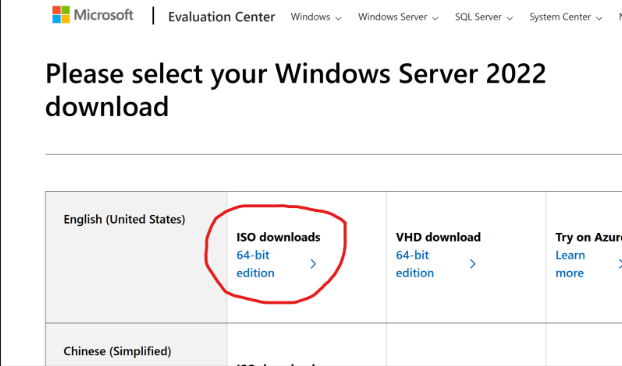
    First up: downloading the tools. Microsoft makes it easy—just hop onto their Evaluation Center, grab the Windows Server 2022 ISO, and you’re good for 180 days (or up to 1080 days if you get creative with re-arms). Luckily, I already had a Windows 11 ISO on hand, but for anyone who doesn’t, here’s the official link.

    Windows Server 2022 Evaluation ISO – Can be downloaded from here

    While the server ISO downloaded, I headed into Hyper-V Manager to set up a new external virtual switch—essential for letting the VMs talk to other devices across my network. With the switch prepped, the ISO finished up just in time for the next phase: creating the actual domain controller VM. I gave it a minimal but adequate spec (4GB RAM, 60GB disk), knowing I can always bump things up if I need to down the road.

    While the server ISO downloaded, I headed into Hyper-V Manager to set up a new external virtual switch—essential for letting the VMs talk to other devices across my network. With the switch prepped, the ISO finished up just in time for the next phase: creating the actual domain controller VM. I gave it a minimal but adequate spec (4GB RAM, 60GB disk), knowing I can always bump things up if I need to down the road.

    Installing Windows Server and Basic Setup 

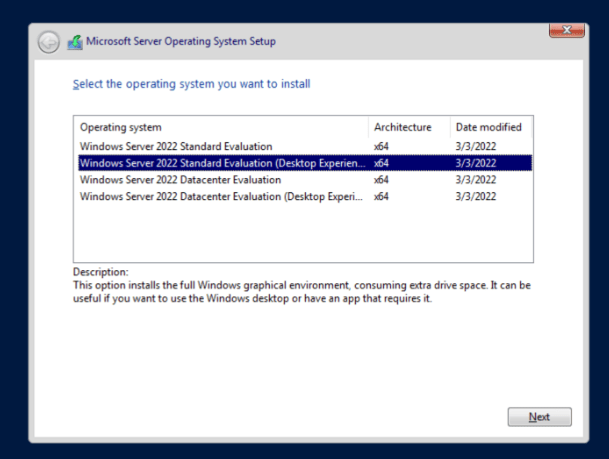
    Watching JR-DC-01 pop up in Hyper-V was weirdly satisfying. I fired it up and started the server install, making sure to select the “Desktop Experience” option—no command-line only installs for me this time! After a quick custom install on my fresh disk, Windows Server was running in just a few minutes.

    From here it was all about the admin basics: creating a strong password, running updates (which took forever—thanks, Microsoft!), and then popping into my firewall to check which IPs were free outside my DHCP pool. Once the server was up to date, I set a static IP so everything on my network stays predictable. 

    Adding the AD DS Role and Promoting to Domain Controller

    With my new admin account set up and Windows fully updated (why do server updates always take so long?), I got ready to configure the server’s static IP. A quick check of my firewall showed which addresses were free outside the DHCP pool, so I set up a neat static IP for the new domain controller—no surprises with DHCP changes down the road.

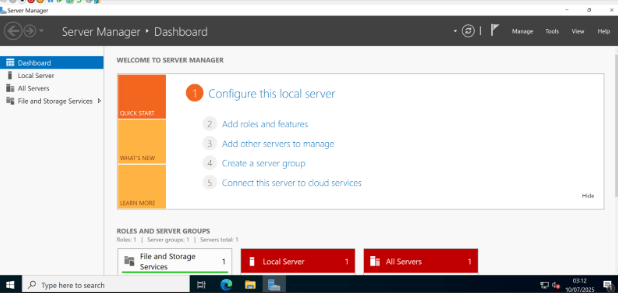
    With networking sorted, I dove into Server Manager to tackle Active Directory. Installing the AD DS (Active Directory Domain Services) role turned out to be refreshingly simple: just click on “Manage,” choose “Add Roles and Features,” and select Active Directory Domain Services from the list. During the prerequisite screen, I deliberately left the DNS Server role unchecked—my UniFi firewall already handles DNS and I figured, why make things more complicated? (Spoiler alert: More on that later!) The installation zipped by in less than a minute.

    Next up was promoting the server to a domain controller, the real heart of this whole exercise. The wizard was straightforward: I selected “add a new forest,” plugged in jr-network.local as my root domain name. After a few prerequisite checks, I hit “Install” and let Windows do its thing. After a quick reboot, I saw that familiar domain sign-in screen pop up. That first log-in with your shiny domain admin credentials feels pretty great—domain admin power, officially unlocked.

    Setting Up the Testing Workstation 

    With the domain controller sorted, it was time to spin up a guinea pig: a Windows 11 Pro VM (4GB RAM, 64GB disk), with TPM enabled to make Windows 11 happy. The install was mostly straightforward, but here’s where I hit my first snag: Microsoft really, really wants you to use a Microsoft Account, opt in to every privacy setting (ironic), and subscribe to Game Pass and Office 365 along the way. I pressed “skip” so many times I started to think Skynet was judging me. 

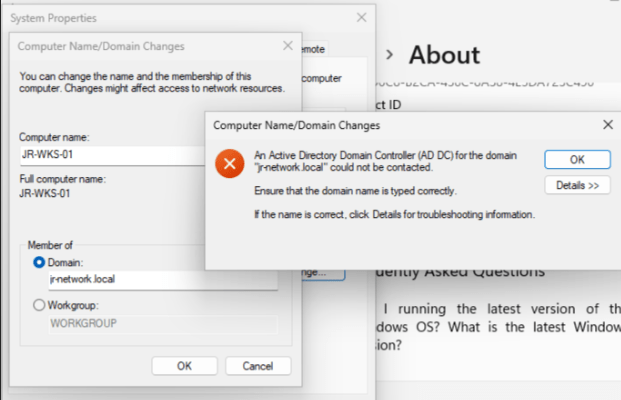
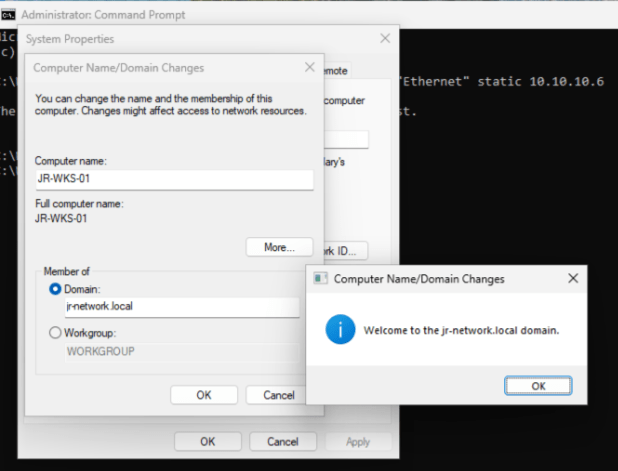
    A small slip-up had me accidentally set up the device as “home,” but after sorting that, I logged into Windows and set about joining the workstation to my shiny new domain—until, of course, I ran smack into an error. Despite double-checking the spelling, network, and connectivity (all fine), it just wouldn’t join. 

    Oops, You Really Do Need DNS… 

    Classic learning moment: turns out, AD domain joins rely on DNS, and I’d skipped installing the DNS Role on the DC. Time for a quick detour—back to Server Manager, enable the DNS Server role, fast-forward through setup, and voilà: DNS was operational. After a DC reboot, domain join worked first time. Gotta love it when a fix is that clean. 

    The Not-So-Simple Part: The Veeam Server Saga 

    With my domain and test workstation finally communicating happily, I turned my attention to reconfiguring JR-VEEAM-01 to join the domain… only to find it was powered off and refusing to start. Because of course it was. I opened up the console and, instead of a login screen, got hit with a fresh error. Homelabbing, am I right? If you ever think everything’s going to go smoothly, the universe sends you a quick reminder. 

    Instead of squeezing that fix into this (already long) post, I’ve decided to save the Veeam adventure for next time. That’ll include troubleshooting whatever is going on, getting it attached to the domain, and setting up proper backup jobs for both the new domain controller and workstation. 

    Lessons Learned & The Road Ahead

    Today, I managed to get a domain controller up and running, deploy Active Directory Domain Services and DNS, and prove out the basics of account and policy management on a test workstation. Even with a few detours, it’s been a solid step forward—and proof that you don’t need a complicated lab to learn real enterprise skills.

    If you’ve read this far, thanks for sharing in my victories (and commiserating in my “facepalm” moments). I hope this gives you the confidence to try setting up your own domain, or at least assures you that bumps along the way are all part of the process. If you want a copy of my detailed documentation or want to see a deep-dive on any step, let me know in the comments!

  • My Current Homelab Setup—and Where I’m Headed Next 

    My Current Homelab Setup—and Where I’m Headed Next 

    Over the past couple of months, I decided it was time to give my old gaming PC a new purpose. These days, I rarely find time to game, so I’ve been looking for ways to get hands-on with something fresh—enter the world of self-hosting. With so much tech shifting to the cloud, I’m eager to see how much I can do on my own, just for the sheer challenge and the chance to learn something new. Of course, the added perk of keeping more control over my own data doesn’t hurt (and no, I’m not a tinfoil hat conspiracy theorist!). For me, it’s about getting curious, gaining new skills, and taking a bit more ownership in an increasingly invasive digital world. 

    The Setup So Far

    Right now, my homelab setup is simple but solid—a great foundation to build on. One of my first moves was ditching the default ISP router for a UniFi networking stack, mainly so I could finally create multiple VLANs and take advantage of built-in IDS/IPS security features. My network now consists of a UniFi Gateway Max, an 8-port Ultra 60W PoE switch, and two U6+ access points, which gives me robust wireless coverage and dedicated networks for personal devices, IoT gadgets, and guests. Everything feels so much more organized—and a lot more secure—since making the switch. 

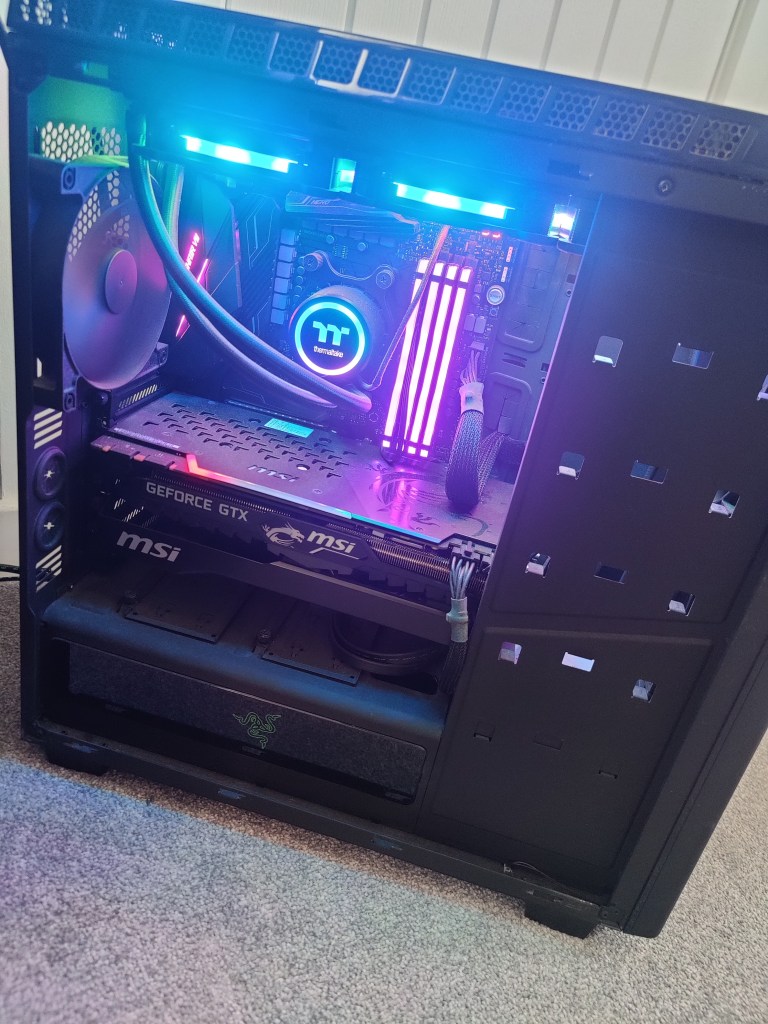
    At the heart of my platform is a repurposed gaming PC, now doing duty as a Hyper-V server. It’s powered by an 8-core Ryzen 7 2700X, 32GB of RAM, a GTX 1080ti, and about 1.75TB of storage cobbled together from a 500GB NVMe SSD, a 1TB and a 500GB SATA SSD, plus a 1TB HDD. At the moment, it’s mainly running a single VM for Veeam backups, leaving me with plenty of room (and plans) for launching new projects. Alongside that, I’ve got a Home Assistant Green running my smart devices, and a Raspberry Pi 2 Model B that’s been collecting dust—just waiting for me to get more hands-on with Linux in the near future. 

    Where I’m Headed Next: Big Plans and New Experiments

    So, where does all this leave me? In short, I want to see just how much I can self-host—and how far I can push my Home Assistant setup. There’s something rewarding about having full control and actually building out the digital tools I use every day. 

    Here’s what’s on my list: 

    • Build and configure a NAS: I’m aiming to create a reliable, expandable storage solution for all my files, backups, and media.
    • Self-host my own cloud storage: Tools like NextCloud and Seafile are at the top of my list for keeping my documents, photos, and calendar in sync—without relying on the big clouds.  
    • Migrate my password manager: I’d like to move everything over to a self-hosted Bitwarden instance. 
    • Set up Plex or Jellyfin: Centralized media storage: each has its pros and cons and I’m not set on what one I’ll go with, but its high up on the list of priorties 
    • Create a VPN: Secure remote access (and the ability to safely share content with friends and family) is a must-have. 
    • Host my own website & try running an AI model: I want to try hosting my own site—and maybe experiment with my own locally hosted AI model 
    • Run my own email server 

    Home Automation

    My basic Home Assistant Dashboard – Out of the box with the Tuya integration configured for managing lights and aircon

    My interest in home automation has really taken off since discovering Home Assistant. Right now, I’ve got a growing pile of smart devices scattered around my house, each with its own app and login. One of the best things about Home Assistant is finally being able to control everything from a single dashboard—no more toggling between a dozen apps just to turn off the lights and lock the door. The platform’s flexibility is wild; I can even pull data from my car, and the potential for custom dashboards and automations is almost endless. 

    I’ve only just dipped a toe into this world, and so far I’ve got the integrations setup for my smart bulbs and air con unit. I’ve repurposed an old Galaxy Tab A that I’m using as a dedicated dashboard to manage these for the time being as a bit of a proof of concept. Once I’ve got a stable platform with more integrations setup, and had made some progress on a custom dashboard then I’ll look to upgrade this to something a bit more sleek. I’d like to get one for each floor too and have them wall mounted with either magnetic wireless chargers, or wired in if I can’t get that to work.

    The Ultimate Smart Dashboard

    One of my big goals is to design and build a dashboard that puts everything I care about front and center—true “mission control” for my home. Here’s what I want it to show and do:

    • Live electric, gas, and water usage, with clear graphs 
    • Family calendar and running to-do list 
    • Weather forecasts and advance commute times (based on our phones’ locations) 
    • Controls for lighting, music, and smart speakers everywhere in the house 
    • Real-time feeds from my CCTV cameras 

    Building the Perfect Setup

    My future plans include building a tidy rack to house all my networking gear, the NAS, and my Home Assistant Green—with room for a small display screen to monitor performance metrics in real time. On top of that, I’m planning a big “smart migration” for my house: upgrading to a smart meter, switching over to smart heating, and replacing all the lighting with gear that seamlessly integrates with Home Assistant. And, for a bit of fun, I’m also interested in building a magic mirror—something that would display the weather, calendar, and news while I brush my teeth. 

    As I work through these upgrades and projects, I’ll be documenting each step, sharing what I learn, and inviting you along for the ride. There’s plenty to build, break, and (hopefully) improve—so if you’re into homelabs, tech, or just enjoy a good experiment, stay tuned! 

  • So, what’s this blog all about?

    So, what’s this blog all about?

    I’m Jack —a curious individual with a passion for tech and media, and a whole range of interests that keep life interesting. This blog is my little experiment: a space where I can share whatever captures my curiosity, ranging from my homelab misadventures to my thoughts on books, TV, music, and other hobbies . If something catches my attention, chances are it’ll show up here.

    Why start a blog? I’ve always found value in writing things down—whether it’s documenting how I solved a tricky problem, collecting notes on my hobbies, or just organizing my thoughts. I hope this blog becomes both a helpful resource for others and a personal archive I can look back on someday.

    What can you expect to find here? Some posts will be deep dives into my homelab setup and explorations in self-hosting and automation. Others will cover media reviews, or updates on my hobbies, and stories from my travel experiences. In short, it’ll be a mix—a digital notepad for whatever I’m working on or thinking about.

    Thanks for stopping by and taking the time to get to know me and this little project. If you’re interested in tech, media, travel, or just enjoy honest reflections, I hope you’ll stick around.

    I’m excited to see where this journey leads and look forward to connecting with all of you along the way!