Tag: technology

  • Reflecting on My Shifting Relationship with Social Media

    Reflecting on My Shifting Relationship with Social Media

    Social media has been a constant presence throughout my life. I was part of the generation that grew up both with and without it — old enough to remember life before Facebook, but young enough to get swept up in the excitement of its rise. Over the years I’ve used platforms like Facebook, Instagram, Snapchat, Reddit, and YouTube, and my feelings towards them have shifted dramatically. 

    What once felt exciting, fresh, and fun now feels complicated. Social media can still be useful — for staying in touch, sharing memories, or learning something new — but it also comes with its fair share of downsides: endless ads, negativity, comparison culture, and the addictive pull to keep scrolling. 

    In this post, I want to reflect honestly on my relationship with social media — the good, the bad, and why I’ve found myself using it less and less as the years go by. 

    Growing Up With (and Without) Social Media 

    I feel lucky to have grown up in a generation that experienced both life with and without social media. I was aware of platforms like MySpace and MSN Messenger, though I didn’t really use them myself. MSN in particular was huge among my friends at school — everyone seemed to rush home just to carry on conversations there. I never joined in, but I remember watching how central it was to their social lives. 

    My parents didn’t let me join social media until I was 13, when I was finally allowed to create a Facebook account. At the time I hated being left out, but looking back, I understand why they made me wait. Facebook in those days was a completely different beast. It felt fresh, exciting, and almost like a game — whoever had the most friends was the most popular. 

    I wasn’t exactly a social butterfly, so my own use of Facebook was fairly modest. I mostly logged in to play games like Social Empires and Social Wars, or to chat with close friends (and occasionally try my luck talking to a girl). The time I spent online was short and sweet, usually 15–20 minutes of chatting in broken abbreviations like “wuu2”, all squeezed into a narrow window on the family computer. Smartphones weren’t around yet — we just had brick-like mobiles for calls, texts, and tinny MP3s beamed across by Bluetooth. In hindsight, I’m actually a bit envious of that simplicity. 

    From there, I started experimenting with other platforms. One I remember dabbling in was Kik, after friends convinced me to join group chats with people I’d never actually met. It didn’t stick, but it was my first taste of how social media could connect you beyond your immediate circle. Things only really took off for me once Instagram and Snapchat launched, though. For the first time, social media wasn’t just about chatting or games — it was about sharing moments, photos, and stories, and being plugged into what everyone else was doing in real time. 

    The Positives 

    Social media has definitely had its benefits. One of the best things about it is how easy it makes it to stay connected. I can keep in touch with friends and family all over the world, something that would have been far harder without it. Back in the early days, it felt incredible to be able to message someone instantly, no matter where they were. 

    It’s also been a great way to keep up with interests and hobbies. Whether it’s technology, LEGO, Formula 1, or gaming, I can get the latest news in seconds. I don’t have to wait for magazines or television coverage — I can open an app and find whole communities discussing the things I care about. 

    Another strength of social media is how it gives a platform to small businesses and creative people. Artists, writers, and even bloggers like me can share their work with audiences they’d never reach otherwise. It’s a powerful tool for self-promotion and for discovering voices you’d never come across in day-to-day life. 

    I also really like how it helps with sharing memories. Facebook’s reminders for photos from years ago always make me smile, and often bring back moments I’d completely forgotten. Without those prompts, a lot of those pictures would probably just sit buried in my cloud storage, never to be looked at again. 

    On the learning side, I think social media has been transformative. YouTube and Reddit have become daily tools for me — not just for entertainment, but for solving technical problems at work, learning new skills, and even just winding down with a video in the evening. In many ways, YouTube has become as much of a streaming service as Netflix or Disney+, and I think it’s one of the most valuable platforms out there. 

    At its best, social media can be a tailored source of news, education, entertainment, and connection. In moderation, it really does have the ability to add value to everyday life. 

    The Negatives 

    As much as social media has positives, it also comes with a long list of downsides — and the older I get, the more I feel like these now outweigh the benefits. 

    One of the biggest problems is how platforms are increasingly dominated by ads, algorithms, and artificial content. Instead of seeing posts from friends and family, I often have to scroll through several adverts or “suggested” posts before finding something I actually want to see. The algorithm might be clever at spotting habits and serving content that keeps me hooked, but it’s not about what I value — it’s about keeping me on the platform as long as possible. 

    That leads into the next issue: addiction and wasted time. I find myself using it intentionally much less, and more out of boredom — the classic “I’ve not got anything going on right now so I’m going to have a quick scroll.” The problem is that a quick scroll often turns into “Oh God, I’ve wasted 45 minutes and now I’m late for work.” It’s shocking how easy it is to lose time without realising, and it leaves me feeling drained rather than entertained. 

    Then there’s the problem of negativity and misinformation. With the rise of AI and content farms, it’s harder than ever to know what’s real and what isn’t. Platforms are flooded with clickbait, outrage, and fake news. Extreme opinions spread quickly, while balanced discussion often gets buried. Add to that the toxic side of anonymity — fake accounts, bullying, and impersonation — and it’s easy to see how damaging it can become. 

    Another issue is comparison culture. Social media lets people carefully curate their lives, showing only the highlights — the cars, the holidays, the successes — while hiding the struggles and everyday realities. For younger users especially, it creates unrealistic expectations of what “normal” looks like and fuels feelings of inadequacy. It’s no surprise self-esteem issues are so common when kids are growing up constantly measuring themselves against influencers or even peers who seem to have it all. 

    And finally, I have mixed feelings about TikTok. On one hand, I know it can be a useful platform for creativity, quick learning, and entertainment. On the other, its reputation for highly addictive short-form content and privacy concerns makes me wary. I’ve avoided using it myself, partly because I know how easily it could eat away at my time without giving me much value in return.

    How It Makes Me Feel Today 

    As an adult, I’d describe my relationship with social media as very mixed. The older I get, the more I realise it isn’t what it once was, and in many ways it feels more harmful than good. 

    These days, I use social media less intentionally and more out of habit. I’ll often open Facebook or Reddit when I’m bored, with no real reason other than “I’ve got a spare moment.” A quick scroll often turns into wasted time, and I come away feeling like I’ve achieved nothing. Reddit at least gives me a sense of purpose — I might go there to check F1 news, troubleshoot a tech issue, or explore a hobby community. Facebook, by contrast, feels like noise: ad after ad, suggested posts, and then maybe a glimpse of something from family or friends. It doesn’t add much value to my life anymore, and I often regret using it. 

    Over the years I’ve slowly cut back. I deleted Snapchat and Instagram and don’t miss them at all. WhatsApp doesn’t feel like “social media” to me — it’s just replaced SMS and calling as my main way of keeping in touch. YouTube is in a different category too: I treat it more like Netflix or Disney+, a mix of entertainment and learning, rather than a feed to scroll. In fact, I’d say YouTube has become one of the most useful tools I use daily, both at work and at home. 

    The biggest frustration is the habitual pull. I catch myself checking my phone when I don’t even need to, almost on autopilot. That itch is hard to ignore, and I know it comes from years of using platforms designed to train attention spans around notifications, short clips, and constant stimulation. It doesn’t feel intentional anymore — it feels like a reflex. 

    I’ve even tried ways to break the habit. I installed a minimalist phone app that removes colourful icons and forces me to type out app names instead of just tapping them. I’ve also set my phone to switch into black-and-white mode after 8pm, which makes apps far less visually appealing. These changes sound small, but they make a difference. It’s harder to scroll mindlessly when the apps look bland and you have to consciously go looking for them. 

    Part of the problem is how locked in social media has become. A lot of apps come preinstalled on phones now and can’t be removed, and deleting accounts isn’t straightforward. Many services use Facebook login as a shortcut, which makes it even harder to cut ties completely. That interconnectedness feels suffocating sometimes — like you can’t fully step away without losing access to other things. 

    Ideally, I’d like to get rid of Facebook entirely and just keep Messenger for the few people I still use it with. But for now, I still feel tied to it, even though I know it doesn’t really benefit me. Most of the time, it feels more like a bad habit than something I enjoy. 

    The Bigger Picture 

    Looking beyond my own use, I worry about the wider impact social media is having on society. 

    The most obvious issue is addiction culture. Platforms are designed to retain attention at all costs, and for many people — myself included — using them has become more of a reflex than a choice. If you swapped “social media” for “drugs” and described the same impulsive behaviours, alarm bells would be ringing everywhere. The difference is that social media is accessible, free, and normalised, which makes the problem harder to see. 

    I also think a lot about younger generations. We joke about “iPad kids,” but it’s no longer funny when you see it happening everywhere. I notice it all the time when I’m out and about — kids in buggies glued to iPads instead of just watching the world go by, or children in restaurants pestering their parents until they hand over a tablet. When I was younger, I’d happily spend time at Pizza Hut drawing on the paper menus or reading while waiting for food — but now it seems that sort of thing has almost disappeared. Screens have taken over. 

    This has shifted the way we communicate too. With autocorrect and predictive text doing so much of the work, grammar and spelling skills have suffered. Eye contact, body language, and other vital social skills risk being lost when most conversations happen through a screen. I know I’ve become lazier with writing over the years — it’s something I can see in myself. 

    Then there are the privacy concerns. People often forget that platforms aren’t really free — we pay with our data. Social media doesn’t just track what we post; it logs our habits, what we click, how long we look at something, even where we are when we use the app. That information is sold on to advertisers, and while it makes for effective marketing, it comes at the cost of personal privacy. 

    Another problem is comparison culture and curated reality. People present polished versions of their lives online — the cars, the trips, the “perfect” lifestyles — while hiding the everyday struggles. This creates unrealistic expectations, particularly for young people, and it fuels insecurity when their own lives don’t measure up. It also amplifies extremes: feeds are often filled with either intense positivity or outright negativity, rarely the ordinary middle ground. 

    Finally, there’s the issue of constant accessibility. With smartphones and social media, people expect instant responses. Decades ago, you might send a letter and wait days or weeks for a reply. Now, if you don’t answer a message within hours, people assume you’re ignoring them. That expectation creates pressure to always be available — fuelling the cycle of constant checking and feeding into the addiction. 

    Final Reflections 

    When I step back and look at my own relationship with social media, I can’t say it brings me much value anymore. Facebook, in particular, feels more like a bad habit than something I enjoy. It used to be exciting — logging on after school to chat with friends or play a quick game — but now it’s a feed of ads, suggested content, and distractions I didn’t ask for. More often than not, I come away feeling like I’ve wasted my time. 

    That’s why I’ve gradually been cutting back. I’ve deleted Snapchat and Instagram, and I see Facebook as the next one to go. If I could keep Messenger and drop the main app, I probably would. Reddit and YouTube still feel useful, but in different ways — Reddit gives me communities and answers, YouTube feels like a streaming service as much as anything else. WhatsApp I see as separate altogether, just a replacement for texts and calls. 

    The more I reflect on it, the more I believe social media in its current form does more harm than good. The positives are still there — memories, connections, learning — but they’re buried under algorithms, ads, comparison culture, and addictive design. I don’t think we can escape it completely, but I do think it’s worth being intentional about how and why we use it. 

    For me, that means continuing to scale back, using it with purpose rather than out of habit, and carving out space where social media doesn’t intrude. I’m much happier in that smaller, simpler bubble — and I think that’s where I’ll keep heading. 

    💭 What about you? How do you feel about social media these days — is it still a positive in your life, or do you find yourself wanting to step back like I do? 

  • RuneScape: Why It’s My Favourite Game of All Time

    RuneScape: Why It’s My Favourite Game of All Time

    When I put RuneScape at number one in my “Top 10 Games” blog post, I realized a paragraph could never capture what this game truly means to me. So, here it is—my dedicated love letter to the most influential game of my life.

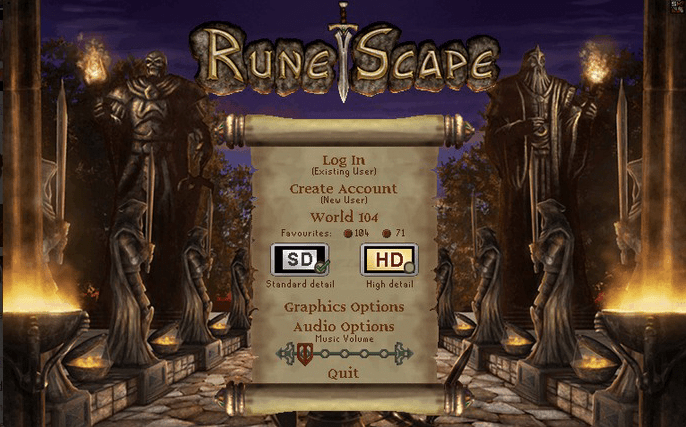
    RuneScape HD Client from 2006

    The Origins: A Rainy Day in 2006

    Ah, RuneScape. The black hole that has swallowed over 5,000 hours of my life (yes, really). The game I’ve always found my way back to, no matter how many times I try to quit—Its probably more addictive than crack (I assume anyway).

    I genuinely can’t remember how young I was when I started playing. All I know is that my main account is now over 14 years old, which still blows my mind.

    My first RuneScape memory is vivid as ever: it was around 2006, pouring with rain, visiting a friend who lived far away. Our parents and siblings were watching TV downstairs. We snuck upstairs to their family computer so he could show me this new game he had discovered. From the second he logged in, I was hooked. We wandered around Lumbridge, picking up cabbages and potatoes until I found a dagger and took down my first goblin, who dropped a goblin mail. I was convinced I managed to wear it (spoiler: definitely not possible), but the excitement was real—a core memory forever unlocked.

    Rediscovering RuneScape—and the True Adventure Begins

    Back then, I didn’t even have access to a computer, so that first experience faded. Until, that is, late 2008, when RuneScape hit a wave of popularity thanks to the new HD client. Suddenly, all my school friends were playing. I distinctly remember huddling round another friend’s screen as a group of us fought our first green dragon together, armed with Dragon Daggers. It was thrilling—we cheered as if we’d conquered the world when that dragon finally fell.

    But it wasn’t until Christmas a year later, when I finally got a laptop of my own, that I dove in properly. While most of my friends drifted away, I found myself drawn deeper and deeper into Gielinor. I tried (and abandoned) a lot of different accounts at first, but finally, in October 2011, I created the one account that would become my digital home for over a decade. Fast forward to today, and—wait for it—I’ve logged an insane 5,666 hours on RuneScape.

    More Than Just a Game

    What turned RuneScape from a pastime to a lifelong passion? The community, for one. Playing with friends and building clans, sharing goals, and even rivalries. I loved leveling my skills (maxing them all for the first time was a personal triumph!), chasing wealth, and diving into boss fights.

    I was always setting myself challenges: killing 10,000 of each dragon type (I only managed two before admitting defeat—there are A LOT of dragons), or collecting every possible boss drop. I nerded out over the in-game economy: flipping items on the marketplace, timing my buys and sells during Double XP weekends. Oddly enough, I picked up real-life lessons about trading, money management, and persistence while playing this “silly” online game.

    My RuneScape journey wasn’t limited to the game itself. I even joined the RuneScape Instagram community for a while, posting edited screenshots of my in-game milestones. It was a great way to meet other fans—and find inspiration for new goals.

    Of course, not all experiences were positive. I had my first brush with gambling at the Duel Arena: I made 100m one night, only to be scammed and then lose it all—plus another 60m—just as quickly. That sting stuck with me, and honestly, put me off gambling in real life too.

    A Real-World Community

    Some of my best RuneScape memories happened outside the game. In 2017, I flew to London for RuneFest with friends. We hit the pre-party, geeked out with famous streamers like Mr Mammal, Woox, and Boaty, and got to play the RuneScape Mobile Beta before anyone else. The whole event felt electric—plus, we made new friends and wandered the city together after. Those are memories you can’t buy.

    Through the game, I also met one of my best friends, who lives in another country—our friendship now spans over seven years (and multiple games together). I’ve even flown across borders to hang out IRL.

    RuneScape 3 vs. Old School—Finding My Niche

    I’ve always been a RuneScape 3 player at heart. I’ve tried Old School RuneScape, especially since most of my friends made the switch, but it just never clicked for me. OSRS is more click-intensive, the XP rates are lower, and—let’s be real—I wasn’t keen on starting from scratch after years of progress. RuneScape 3 has become more of a “second screen” game for me, something casual to grind while watching TV or playing something else. Still, I have huge respect for the OSRS community and would absolutely recommend it to anyone looking for a challenge (and a vibrant, nostalgia-soaked community).

    Giving Back: The Golden Party Hat Drop

    About six months ago, I felt the urge to “retire” in a memorable way. I wanted to give back to the community that had given me so much. So, I started stockpiling Golden Party Hats—managed to save up 15! I took them to the Grand Exchange in a free-to-play world and hosted an impromptu drop party, scattering hundreds of millions of GP worth of items for anyone to find. People absolutely lost their minds. For an hour, I handed out wealth, in the hopes of sparking that same feeling someone once gave me when they gifted me a Robin Hood hat as a newbie. It was my way of paying it forward—a small legacy.

    Of course, even giving everything away didn’t keep me away for good (as I write this, I’m literally AFK farming Green Dragons… old habits die hard).

    Why RuneScape Still Matters

    Even though I stopped playing “seriously” about three years ago, I’ll always come back for a nostalgia hit. Over 11 years, I maxed my account, hit 120 in five skills, and forged friendships that have lasted far beyond the game. I have zero regrets for a single hour spent in Gielinor.

    If you’re considering giving RuneScape a go—do it. RuneScape 3 is fantastic for a more relaxed experience and epic boss battles. If you want a hardcore grind with an active, tight-knit community, Old School might be your new home. Either way, there’s a blast waiting for you.

    Have you played RuneScape before? What’s your favourite memory from the game? I’d love to hear your stories!

  • My Ultimate Top 10 Favorite Games of All Time

    My Ultimate Top 10 Favorite Games of All Time

    A bit of a different post today! I thought I’d go back to where my interest in computers really started—playing games. So what better way to kick things off than by sharing my Top 10 games of all time? These are the ones I’d recommend to anyone, and the ones that mean the most to me—all of them have been my number one at some point in my life.

    My gaming journey has mostly been on Xbox, ever since I got my first proper console—the original Xbox—and I’ve had every generation since. I only branched out to PC because I wanted to experience RuneScape in higher quality (and trust me, it was worth it). That jump to PC ended up being a gateway to so many new games I never thought I’d get into.

    Everyone’s got those games they just can’t forget, and these are mine. These are the titles I keep coming back to, packed with stories, memories, and more late nights than I can count. Let’s dive in!

    10 – Rise of the Tomb Raider

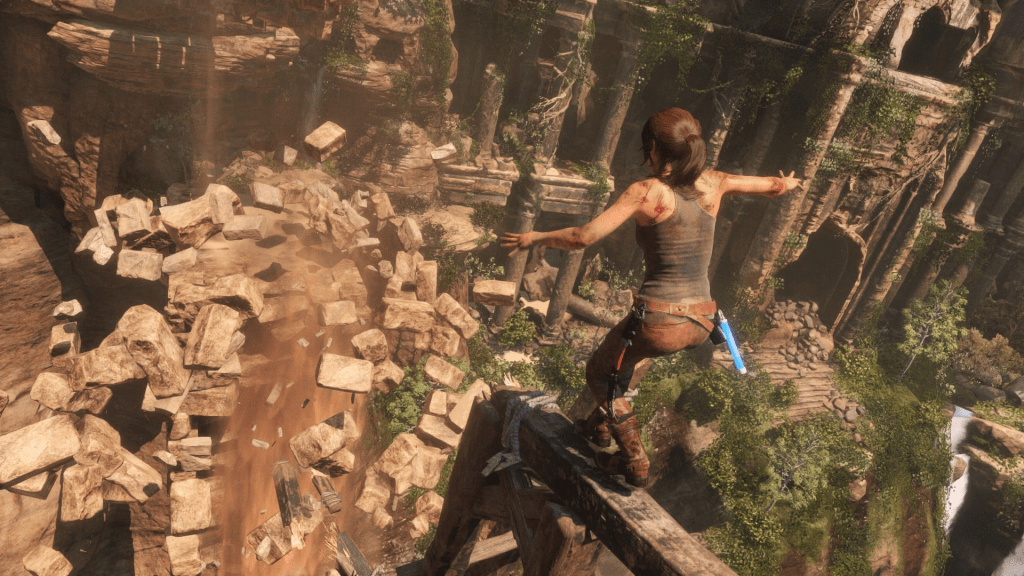
    Out of all the games I’ve played, Rise of the Tomb Raider easily claims a spot in my top ten—and it’s not just because of the epic action and gorgeous graphics (though, trust me, those help). 

    I picked it up on PC in on its release in 2016 and was instantly blown away by the incredible graphics and immersive environments. Exploring the snow-covered wilds and ancient ruins felt like an adventure I didn’t want to end, and I often caught myself pausing just to admire the scenery. 

    What really hooked me, though, was Lara’s growth as a character. The story picks up right after the 2013 reboot, and seeing Lara become stronger and more complex kept me fully engaged. I also loved how the revamped skill trees let me shape her abilities to match my playstyle, making every upgrade feel personal. 

    Ultimately, it’s the combination of beautiful design, exciting customization, and Lara’s evolving journey that makes Rise of the Tomb Raider unforgettable for me. It’s the kind of game I’d recommend to anyone who loves a good adventure. 

    9 – Tomb Raider (2013)

    Sometimes a game totally defies your expectations—in the best possible way. That’s exactly what happened to me with the 2013 Tomb Raider reboot. 

    When it launched, I don’t think anyone—myself included—was prepared for just how good it would be. This reboot reimagined Lara Croft as a much younger and more vulnerable adventurer, focusing on her first, harrowing steps toward becoming the icon we know today. The game took a darker, grittier approach to her origin story, and it was a breath of fresh air for the series. 

    What really made it stand out for me were the updated combat mechanics, absolutely gorgeous graphics, and immersive world. The story is intense from the very beginning—I still remember jumping out of my seat trying to escape those terrifying tunnels after Lara’s disastrous fall. It was genuinely exhilarating. 

    This is one of those games I’ve played over and over—I even lost track of my replays. My brother got so into it he tried to 100% complete everything. For me, the 2013 Tomb Raider isn’t just a reboot; it’s a must-play adventure that left a real mark, and one I’m always happy to revisit. 

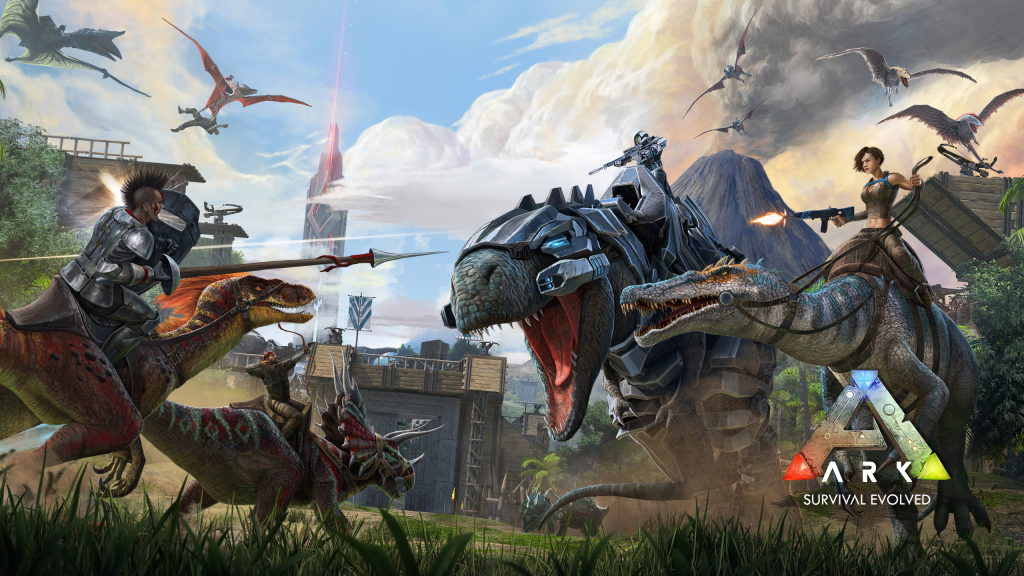
    8. Ark: Survival Evolved

    I was embarrassingly late to the ARK: Survival Evolved party—not diving in until 2021—but I wish I’d tried it way sooner. 

    For years, friends kept recommending ARK, but always as a PvP experience—and honestly, PvP never interested me. It was only when my partner and I finished A Way Out and began hunting for our next couch co-op adventure that I finally gave in, spotting ARK on sale in the PS4 store. In a time when local co-op feels like a dying art, ARK reminded me exactly why it needs to come back. 

    Set in a prehistoric world filled with dinosaurs, survival challenges, and endless possibilities, ARK quickly turned into our digital playground. We had a blast exploring new areas and taming all sorts of wild creatures, even creating our own personal zoo and breeding baby dinosaurs. On PS4, the only real downside was being tethered to within about 300 meters of each other, which made exploring as a team a bit tough. Eventually, we couldn’t resist upgrading to an Xbox Series X, where that limitation disappeared and the graphics blew us away. Suddenly, we could roam independently—and that freedom made the game even better. 

    I’ve now logged over 400 hours exploring every corner of ARK’s various maps, and it’s a game my partner and I keep coming back to. If you’re looking for a survival adventure that rewards teamwork and curiosity—or just want to make your own dino zoo—ARK is absolutely worth your time. 

    7 – Star Wars: The Old Republic

    Some games are truly worth the wait—Star Wars: The Old Republic (SWTOR) is definitely one of those. 

    I missed the game’s big 2011 launch, mostly because my old laptop couldn’t handle it, even though those unforgettable cinematic trailers completely sold me on the idea. It wasn’t until I built my first proper PC and started seeing ads for the Shadow of Revan expansion that SWTOR jumped back onto my radar. With Revan being one of my favorite characters from the Knights of the Old Republic era, I downloaded it immediately. 

    What surprised me most was just how much choice the game offers: there are eight unique character classes (four for the Republic, four for the Empire), each with its own engaging story and playstyle. No matter how many times I returned, I could always pick a new class for a totally fresh experience. My first run as a Sith Inquisitor was so immersive—with awesome cutscenes, stellar voice acting, and a storyline that kept me hooked all the way through Shadow of Revan and beyond. 

    Since then, SWTOR has only gotten bigger. The game now boasts multiple major expansions—Rise of the Hutt Cartel, Shadow of Revan, Knights of the Fallen Empire, Knights of the Eternal Throne, Onslaught, and Legacy of the Sith. Every expansion adds more content, stories, and ways to play, making it easy to lose yourself in the galaxy again and again. 

    One of my favorite aspects is the community. I created and managed a guild with over 200 players. Together, we tackled grouped flashpoints, dominated weekly heroics, and ran regular events—or just chilled out on our guild flagship. The social side of SWTOR has brought me back time and again, especially when new content drops. 

    All in all, SWTOR is one of those rare games I keep coming back to, year after year. While it might not be as popular as it once was, it still has a strong, loyal fanbase and continues to receive new content and expansions, keeping the galaxy alive for both new and returning players. For Star Wars fans or MMO enthusiasts, I can’t recommend it enough—it’s hands-down one of the best Star Wars games out there. 

    6 – Fallout 4

    Fallout 4 wasn’t even on my radar until my brother and I unwrapped our Xbox One at Christmas 2015—and there it was, bundled right alongside Halo 5. Being a die-hard Halo fan, I put Fallout aside for a while, not realizing I was about to be sucked into one of the most addictive games I’d ever played. 

    Right from the dramatic intro, the game pulled me in: create your character, watch the world end, and suddenly you’re a parent searching for your son in the Wasteland. Bethesda’s classic combat system gave me endless ways to experiment, but what really got me hooked was the settlement building. I spent hours scavenging junk to build and defend massive forts, set up farms, and create little civilizations to keep the Wasteland running. 

    The story was a blast, with plenty of factions to side with and new endings to find. And with all the wild mods out there, the game never really got old. My personal highlight? Finally assembling a full set of X-02 Power Armor, or finishing the game with the Brotherhood of Steel powerhouse, Iron Giant vibes (If you know, you know)  

    Looking back, Fallout 4 completely surprised me—and ended up being one of my top gaming experiences, and each DLC brought something new and exciting, keeping me coming back for more. 

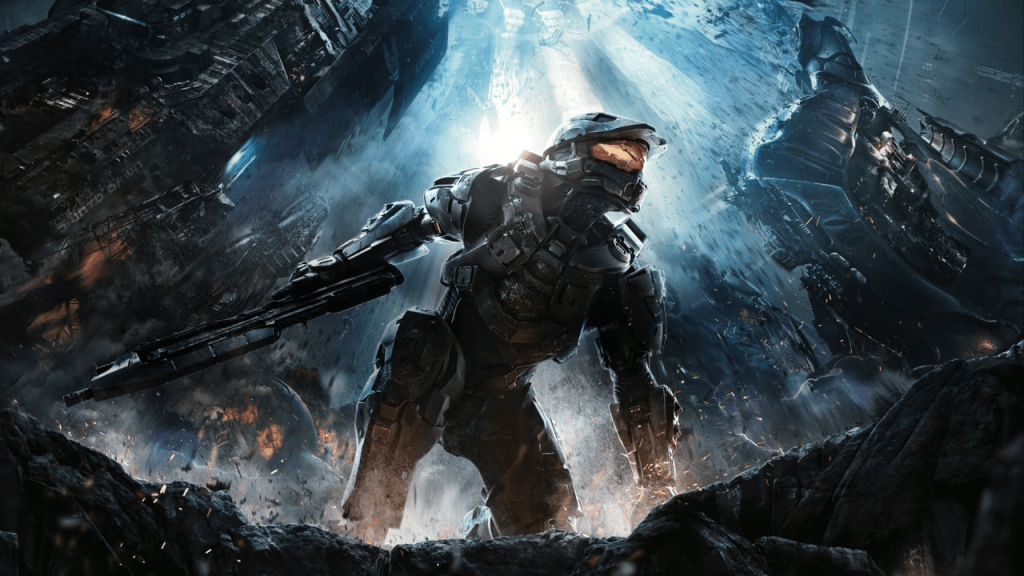
    5 – Halo 4

    Halo 4 was the first Halo entry from 343 Industries, but for me it became an instant favorite—and easily the game I’ve replayed the most by far. Picking up right after Halo 3, suddenly we’re waking up as Master Chief in the wreckage of Forward Unto Dawn, only to be whisked away into the mysterious shield world of Requiem and thrown headlong into a battle with the Forerunners. New weapons, new enemies, and a fresh direction for the story (less Covenant, way more Forerunner intrigue) made it feel like a whole new world for Halo. 

    The campaign was a blast solo, but it really shined in co-op—I lost count of how many times my brother, my partner, and I ran through those missions together. I absolutely loved Forge mode too; nothing beat designing maps, setting up bases at opposite ends, and trying to outwit my brother in Capture the Flag showdowns. 

    And honestly, this was the online FPS I put the most hours into. Tons of maps, wild game types, and an addicting armor unlock system meant most of my multiplayer glory days were spent right here, climbing ranks and, on rare occasions, actually carrying the team. Halo 4 will always be a highlight in my gaming history 

    4 – Halo: Reach

    Before the 343 Industries era and Halo 4, there was Halo: Reach—the final Halo from Bungie, and what a game to end on. As a direct prequel to Halo: Combat Evolved, Reach pulled me into the emotional chaos that led to the fall of humanity’s last major stronghold before Master Chief’s journey ever began. Instead of focusing on familiar faces, we joined Noble Team, a squad of Spartans with their own personalities, all fighting a losing battle against impossible odds. It was a bold move that really paid off. 

    I loved the shift in tone—on Reach, there are no happy endings, and it made every mission feel meaningful. Co-op was a huge highlight here; my friends and I would lose hours running missions together, strategizing our way through impossible firefights. 

    One of my absolute favorite additions was the Falcon, a new aircraft that offered a fresh way to zip around the battlefield. And I have to shout out Firefight mode, which cranked up the intensity with wave after wave of tougher enemies—surviving ‘just one more round’ often turned into a whole evening of mayhem. 

    Forge mode was back and better than ever. I distinctly remember having friends over and spending hours building what we claimed was the “ultimate sky base” high above the map. We never really finished it, but man, it was awesome seeing our wild plans take shape. 

    While a lot of fans call Halo 3 the series’ peak, for me, Halo Reach was something truly special—raw, creative, and unforgettable. 

    3 – Star Wars: Knights of the Old Republic 2

    Ah, the infamous unfinished sequel—Star Wars: Knights of the Old Republic II, easily one of my favorite RPGs and, if we’re being honest, the follow-up to the best Star Wars game ever made. After the phenomenal success of the first KOTOR, expectations were sky-high. This time, Obsidian took the reins and set us loose a few years after Revan’s story ended. 

    Funny thing is, I didn’t even realize KOTOR had a sequel. I only stumbled onto it when I was hunting for a replacement copy of the original (which I was convinced I’d lost forever). Discovering that there was more KOTOR to play was a next-level revelation—I had to beg my dad to buy it for me. Once I had it in my hands, I tore into it like it was a lost holocron. 

    Right from the start, you’re tossed into a galaxy that feels both familiar and brand new. Instead of playing as Revan, you’re the mysterious Jedi Exile, trying to piece your past together while navigating a war-torn galaxy where Jedi are being hunted to extinction. One of my favorite surprises? Running into old friends and former allies from the first game. Those moments felt like unexpected reunions—sometimes rewarding, sometimes awkward, always fun to see how each character had changed (or not) since the original adventure. But honestly, it’s the new characters, each with their unique quirks and backstories, who really steal the show. 

    What set KOTOR II apart for me was how much deeper the game went with customization. Weapon and armor crafting got a serious upgrade—suddenly your skill choices actually mattered. If you wanted to build the best lightsaber or perfect your armor mods, you had to invest in the right abilities to make it happen. 

    But hands down, the best feature was the companion influence system. Your choices shaped how your crew viewed you, unlocking new dialogue, side quests, and—here’s the kicker—potentially training companions to become Jedi or Sith. I still remember the shock and excitement when I accidentally unlocked a swath of new Force powers for a buddy on Nar Shaddaa. It completely changed how I thought about party management. 

    The adventure took us to some unforgettable new planets, dove deep into Mandalorian lore, and introduced not one, but three new antagonists—each more mysterious and morally gray than the last. The writing was brilliant, with every companion and enemy feeling nuanced and real. 

    Sure, KOTOR II had its flaws—rushed development meant a lot of planned content never made it into the final cut. Thankfully, the legendary Restored Content Mod salvaged much of what was lost, and I’d recommend it to anyone playing the game now. 

    Even unfinished, KOTOR II easily improved on the original in some ways. It still amazes me to think of what we might have had if it was given the development time it deserved. As it stands, it’s a flawed masterpiece—and one I still find myself coming back to, just to see what new twists another playthrough might bring. 

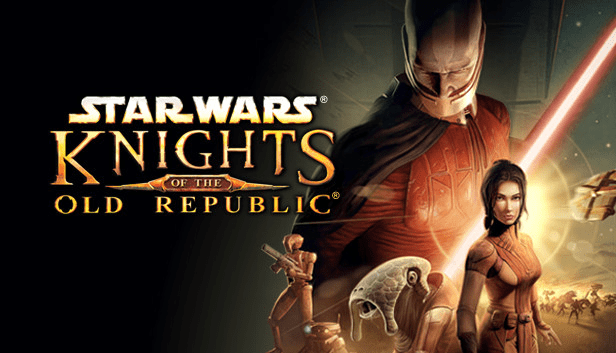
    2 – Star Wars: Knights of the Old Republic

    No game on this list took me longer to beat—and none had a bigger impact on my passion for Star Wars—than Knights of the Old Republic. 

    Star Wars: Knights of the Old Republic (KOTOR) is a legendary, story-driven RPG set thousands of years before the films. With its unique turn-based combat and your choice between the light or dark side, KOTOR hands you the fate of the galaxy and lets you shape your story one decision at a time. 

    My journey with this game is a saga all its own. I don’t even remember buying KOTOR; it just showed up one day in a pile of old Xbox games, tucked away in our wooden chest of console games. My first encounter with the game was less than heroic: I got completely stuck in the tutorial on the Endar Spire, unable to figure out how to escape the bridge. I gave up in frustration and set it aside for what turned into years. 

    The second time I played, things went a bit better—I finally made it off the ship and landed on Taris, only to get stuck again and lose motivation. Another long break followed. It wasn’t until my third attempt, with a bit more gaming experience under my belt (and perhaps some accidental luck), that I finally escaped my curse, found my way through those early obstacles, and actually started to experience what KOTOR had to offer. 

    And wow, was it worth the wait. KOTOR’s unique turn-based combat let me play as I wanted—melee, blasters, Force powers—you name it. Its influence system literally changed your character’s appearance and story as you leaned into the darkness or held on to the light. And the plot twist? To this day, it’s the best twist I’ve ever experienced in any game. The narrative is outstanding, with multiple endings shaped by your choices and a galaxy full of planets to explore—some familiar, some totally new. Each companion on your journey has a compelling backstory, making every interaction meaningful. 

    To this day, I’ve owned KOTOR on every platform it’s been released on—Xbox, PC, even mobile—and it’s the one game I replay almost every year. More than any other game, it’s responsible for turning me into a lifelong Star Wars fan. I honestly think I’d be a completely different person if I hadn’t finally stuck with it and finished it. 

    1 – RuneScape

    There’s one game I always come back to, no matter how hard I try to quit—RuneScape is my number one, and honestly, it’s more addicting than crack. 

    If I added up all the time I’ve spent skilling, questing, and just hanging out in Gielinor, we’re easily talking over 5,000 hours. I wish I were kidding. With more than 14 years on my main account alone, RuneScape has been the ever-present backdrop to my gaming life, and I know deep down that nothing else comes close. 

    RuneScape launched way back in 2001 as a simple browser game built in Java, originally called DeviousMUD. Since then, it’s evolved through eras—RuneScape Classic, RuneScape 2, RuneScape 3, and Old School RuneScape, and even mobile—each version keeping that core spark alive for new and returning players. No matter which version you play, you’re in for a world of adventure in the medieval fantasy realm of Gielinor. 

    But it’s nostalgia that always brings me back to RuneScape’s top spot. Those “golden days” of RuneScape hold some of my fondest memories: the best online community I’ve ever seen, genuinely kind people, and friendships that escaped the screen and turned into real life adventures. I learned lessons in negotiation (flipping items at the Grand Exchange was my first taste of capitalism), gained random but useful real-world knowledge (impressed classmates with “fun facts” about bronze), and met lifelong friends—including at RuneFest and trips across the world. 

    Graphics were never RuneScape’s selling point—in fact, the famously blocky and outdated areas are part of what makes the game so charming. It’s the lore, the community-driven events, and the way player choices once shaped the direction of the world that set it apart. My favorite memories range from getting my first membership, to that adrenaline rush of earning my first 99 skill, to the thrill of finally maxing my account. There’s always a new goal to chase, whether you’re a classic adventurer or diving into the challenging Ironman, Hardcore Ironman, or Group Ironman modes. 

    RuneScape’s appeal is timeless, which is probably why the developers released Old School RuneScape in 2013, reviving a version frozen in the era so many of us loved. It turns out, sometimes nostalgia really is unbeatable—Old School now rivals, and often surpasses, the modern game in popularity. 

    Though RuneScape isn’t quite what it was at its absolute peak, there’s still a ton of content and an amazing (if smaller) community. The connections I’ve made are real, and the fun I’ve had is unforgettable. RuneScape taught me, entertained me, and brought me friends for life. It’s more than a game; it’s a second home, and one I’ll always recommend. 

    Looking Back: The Games That Made Me

    From heart-pounding adventures and epic RPGs to community-driven worlds and nostalgic favorites, these ten games aren’t just milestones in my gaming journey—they’re snapshots of who I am and where I’ve been. Whether it’s surviving prehistoric lands, exploring ancient tombs, or forging lifelong friendships in virtual worlds, each title on this list has left its mark on me. I hope this countdown inspires you to revisit an old favorite or maybe find something new to try.

    If you enjoyed this post, feel free to leave a comment with your own top 10 or any memories you’d like to share—I’d love to see which games made an impact on you, too. And if you want to see more posts like this, don’t forget to follow along. Happy gaming!

  • Fixing My Veeam Server (and My Sanity): An Unexpected Backup Adventure

    Fixing My Veeam Server (and My Sanity): An Unexpected Backup Adventure

    In my last homelab misadventure, I wrapped up unable to reach my Veeam server. After a little sulking and a lot of thinking, I decided to nuke it from orbit and just start from scratch. Sometimes trying to patch up old decisions isn’t worth it, especially when you made those choices late at night with one eye closed. 

    Before hitting the big red reset button, I considered all my options. There are plenty of other free backup platforms out there, but Veeam is the one I’m most familiar with, and honestly, it’s a staple in enterprise environments for a reason. The free version lets you back up up to 10 VM’s—which is more than enough for my lab—so sticking with what works made sense. 

    So, I deleted my Veeam VM (JR-VEEAM-01), cleaned up the leftovers, and prepped my trusty Windows Server ISO. Creating a fresh VM in Hyper-V took all of two minutes—this time with a slightly bigger disk, because you can never have too much storage, right? 

    The VM fired up without a single complaint, and the Windows Server install was done and dusted in just a couple of minutes. While it worked its magic, I switched over to my Domain Controller to set up a shiny new Domain Admin account—nothing like a fresh start all around. Once Windows finished installing, I renamed the server to JR-VEEAM-01 and aimed to join it to the domain. Or, well… I tried. 

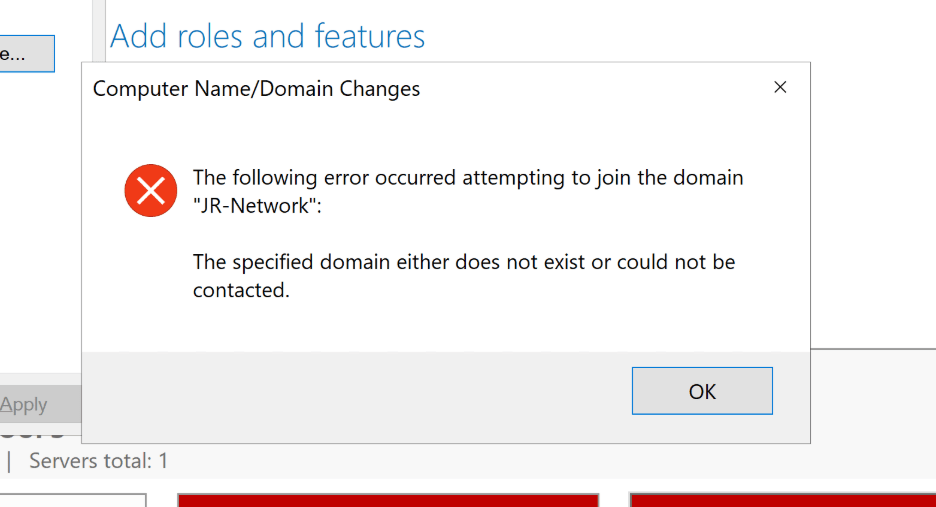
    Wouldn’t you know it—same domain join error I ran into when setting up my workstation before. Classic homelab déjà vu. 

    Turns out, I’d skipped setting up the network adapter properly. The server was on the right subnet, but the DNS was still pointed at the default gateway. A quick PowerShell session sorted that out: 

    # Assign new IP, subnet, gateway 
    New-NetIPAddress -InterfaceAlias “Ethernet” -IPAddress 10.10.10.7 -PrefixLength 24 -DefaultGateway 10.10.10.1 

     
    # Assign DNS server 
    Set-DnsClientServerAddress -InterfaceAlias “Ethernet” -ServerAddresses 10.10.10.6 

    Just to be sure, I ran a couple of commands to check everything updated as expected: 

    Get-NetIPAddress -InterfaceAlias “Ethernet” 
    Get-DnsClientServerAddress -InterfaceAlias “Ethernet” 

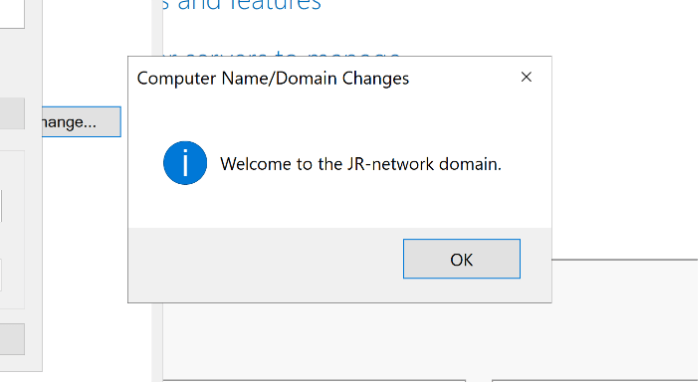
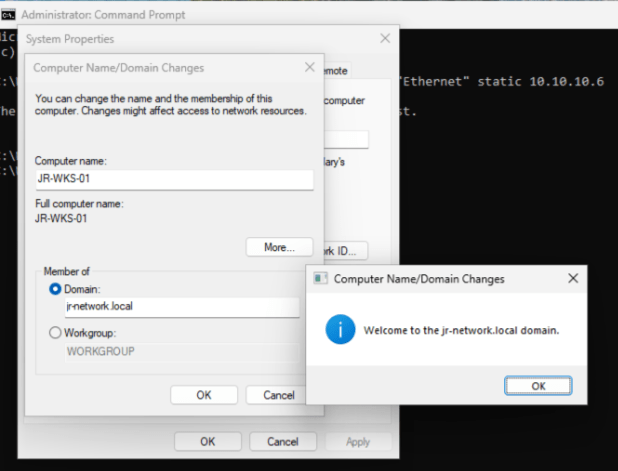
    After patting myself on the back for fixing the adapter, I promptly hit another “oops” moment: I’d only been using the UPN to join the domain, not the proper Domain\UPN format. Turns out, reading prompts helps. Once I logged in correctly, the domain join went through without a hitch. Noice. 

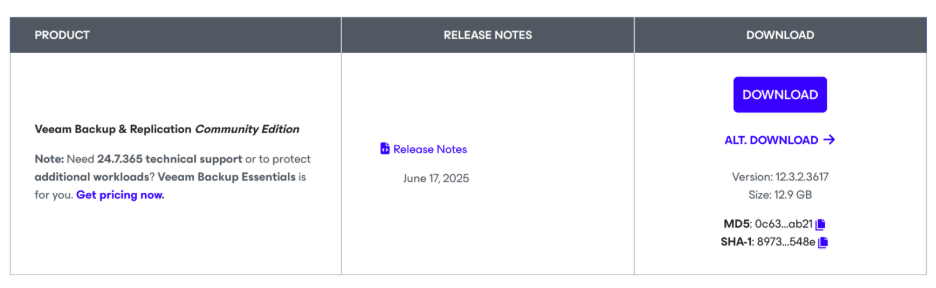
    Once the VM had restarted and settled into its new domain home, it was time for the main event—getting Veeam installed. I headed over to Veeam Software for Enterprise, signed in (pro tip: you’ll need a free account to grab Veeam Backup & Replication), and got the download rolling. 

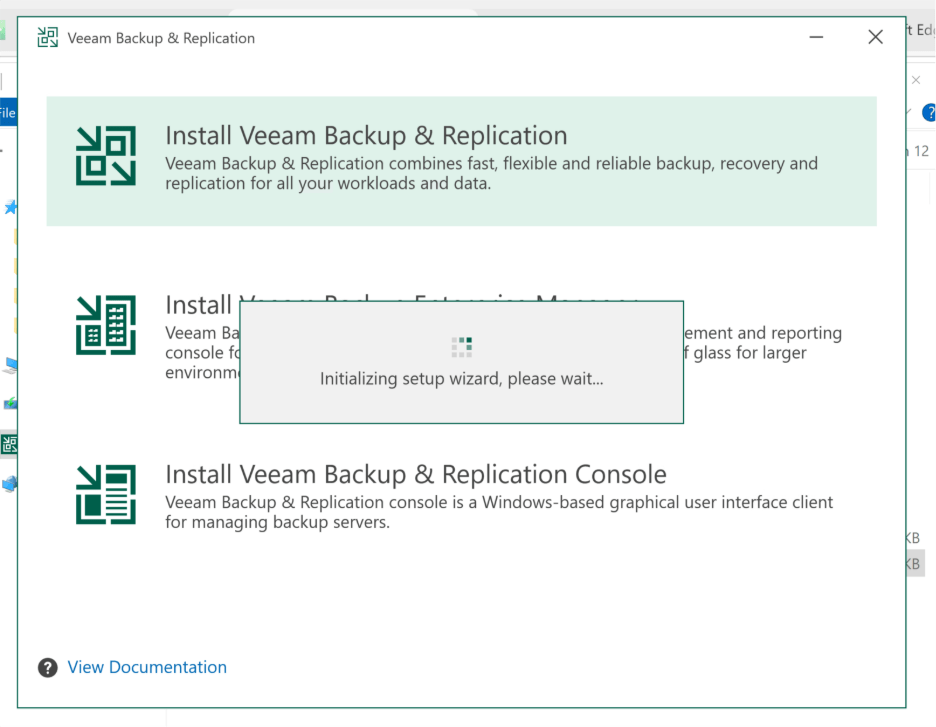
    With the install file in hand, I mounted the ISO, fired up the setup, and got greeted by the install wizard. Right off the bat, it asked for a license—since I’m using the free community edition, a simple tap of “Next” did the trick. No license key, no stress. 

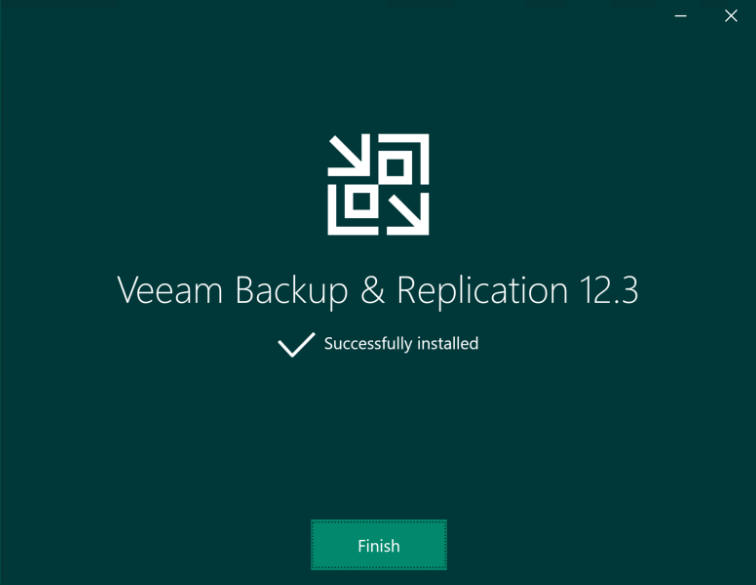
    Veeam checked my system for missing features and dependencies, offering to install anything needed (which, lucky for me, wasn’t much this time). After that, I kicked back with a cup of tea and about half a pack of biscuits. By the time my mug was empty, Veeam was installed and ready to go. 

    Now for the fun part: cracking open the Veeam console and finally getting into the backup setup. 

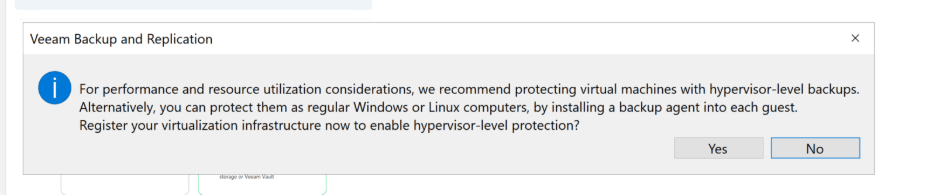
    Before I could dive straight into setting up those backup jobs, Veeam put up a window asking if I wanted to register the host—best practice in most cases, so of course, I hit “YES.” This kicked off another wizard to add my Hyper-V host. I punched in the device name, set the type as “Hyper-V Standalone Server,” and plugged in the credentials for the host’s local admin account. 

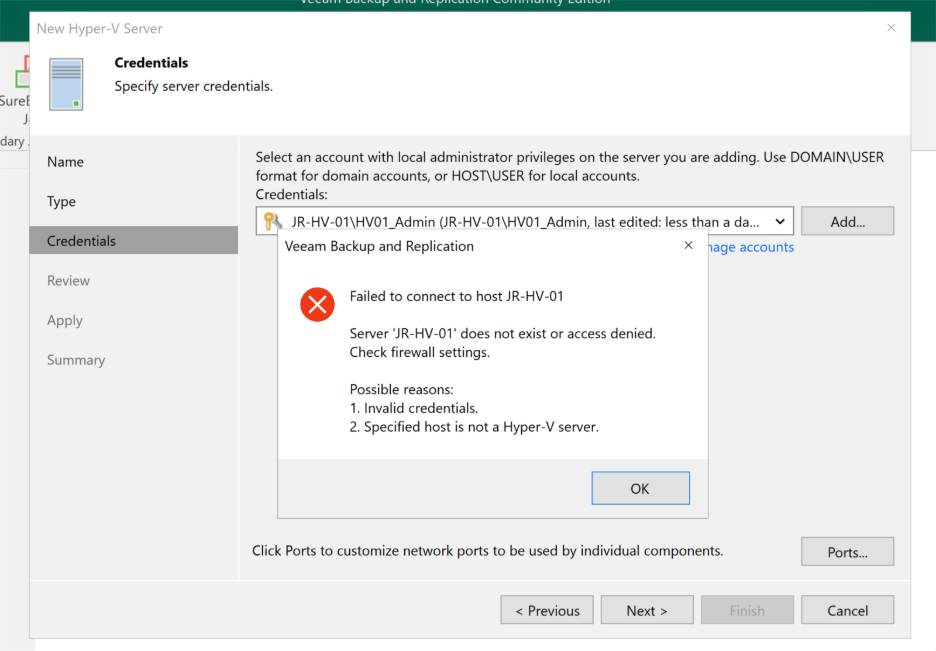
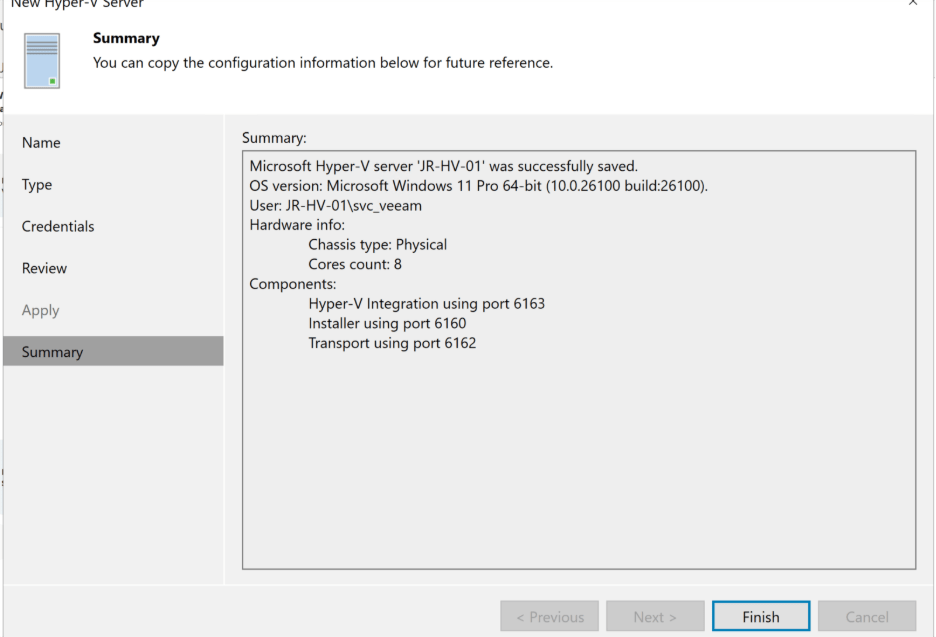
    Naturally, that’s when I hit an error. (Is it even a homelab setup if you don’t hit a permissions snag or two?) Instead of wrestling with password resets or risking bad security habits, I pivoted to best practices: jumped back on the host and quickly created a dedicated service account called svc_veeam just for Veeam’s use. 

    Back in the Veeam console, I swapped in the new service account credentials. After a quick round of testing and validation, Veeam gave me the green light—the host was now registered and ready for Hyper-V backups! 

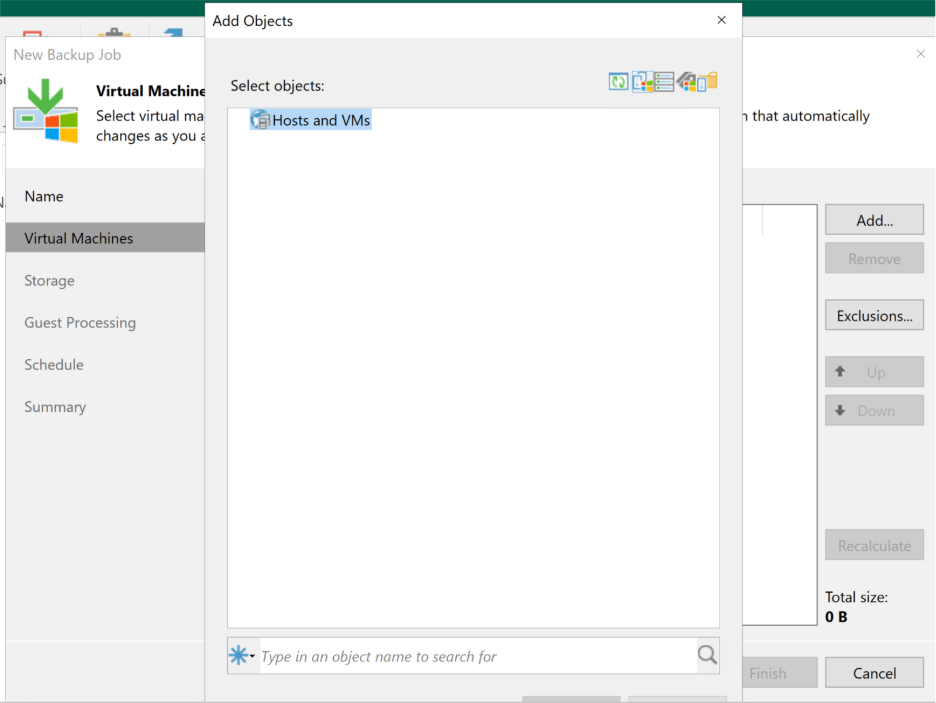
    With the host officially registered, I figured it was finally time to set up some backup jobs. I jumped up to the top left, clicked “Backup Job,” and selected “Virtual Machine Backup.” I even gave my job a fancy new name—Hyper_V_Daily—and got ready to pick which VMs to backup… except, weirdly, there were no VMs listed. 

    Not to be outdone by a blank window, I hopped over to Backup Infrastructure, rescanned the host, and tried again. Still nothing. That’s when it hit me: facepalm moment. I’d only added the host itself, not the actual guest VMs. To get those into the mix, I’d need to add them manually—with proper domain admin rights, of course. 

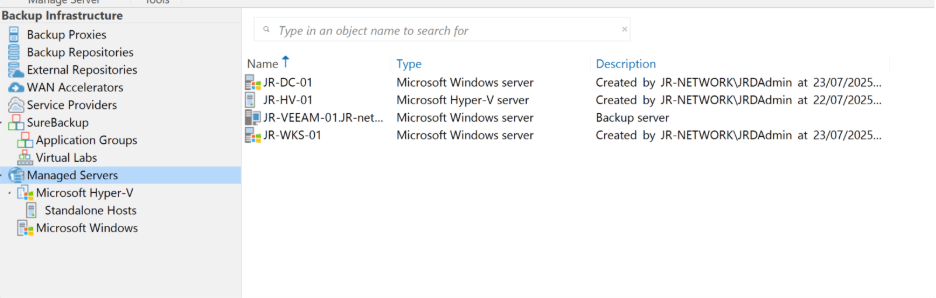
    So off I went to the domain controller to spin up a domain service account just for Veeam. Then, back in the Veeam console, I made my way to Backup Infrastructure, selected “Managed Servers,” and added my other two VM’s—JR-DC-01 and JR-WKS-01—using the same best-practice process. No need to add JR-VEEAM-01 since Veeam was running right there already. In theory, this should have been the breakthrough. 

    But theory doesn’t always translate to practice! When I tried to connect to my test workstation, up popped another error. 

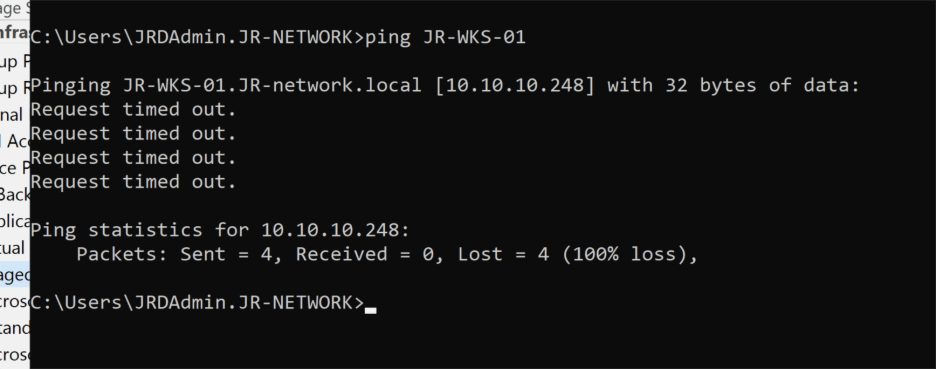
    Well, that sounded like your run-of-the-mill communication issue. Time for some basic troubleshooting: I fired up Command Prompt and tried to ping the workstation—and wouldn’t you know it, zero response. Looks like we found our next issue. 

    So, I hopped over to the workstation and opened up good old Command Prompt to see what was happening. The network settings looked fine: the IP was in the right subnet, and interestingly, the workstation could actually ping the Veeam server without any issues. Okay… so why couldn’t the Veeam server see the workstation? 

    That got me thinking—maybe something was actively blocking the traffic from the Veeam side. A peek at Windows Defender Firewall on JR-WKS-01 revealed that all network profiles—Domain, Private, and Guest/Public—were enabled. For now, I decided to just switch them all off (don’t worry, Group Policy will be handling these rules properly later on). 

    Back at the Veeam server, I tried pinging the workstation again—and bingo, it worked! Sometimes troubleshooting is as simple as flipping the right switch. Simples! 

    With both devices finally talking to each other, I tried adding the workstation once more—and this time, Veeam installed the necessary components without a hiccup. Success! Now all three VM’s were showing up in Veeam, which meant, in theory, I was ready to finally create that daily backup job. 

    Well… not so fast. I went through the steps to set up a new backup job and, yet again, none of my VM’s appeared. At this point, Windows Defender Firewall seemed like the usual suspect—not just on the workstation, but maybe on the host as well. 

    Sure enough, on the Hyper-V host, the firewall was not only enabled, but the network profile was set to “guest” instead of “private.” That’s an easy fix: I opened PowerShell and ran: 

    Set-NetConnectionProfile -Name “JR_Home 2” -NetworkCategory Private 

    Then I disabled Windows Defender for good measure. After another trip back to Veeam and a rescan of the host, I optimistically tried to set up the job once again… and nothing. Still couldn’t see any of the guest VM’s. Weird. 

    Time for some deeper troubleshooting. I double-checked that WMI was working—no issues there. Next, I wondered if the fact that the host wasn’t joined to the domain could be blocking remote management. So, I fired up this command to test connectivity: 

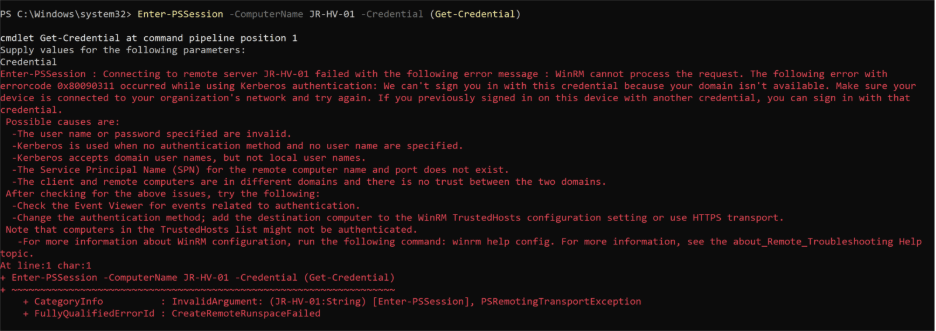
    Enter-PSSession -ComputerName JR-HV-01 -Credential (Get-Credential) 

    And prepared for the next plot twist… 

    Sure enough, the Enter-PSSession command threw an error. At least I was getting somewhere—an error is better than nothing! My first instinct was to simply add the host to the domain, but since this is just a test environment, I’d rather not overcomplicate things. There had to be a workaround, so I dug a little deeper. 

    Good news—there is! You can configure WinRM to work across workgroup or non-domain devices. It takes a little more setup, mostly around adding the Hyper-V host to the list of trusted devices, tweaking authentication settings to use NTLM instead of Kerberos, and enabling remote access. 

    First up, on the host itself, I opened PowerShell and ran: 

    Enable-PSRemoting –Force 

    Super straightforward. Next, I hopped back to the Veeam server and added the host as a trusted device: 

    Set-Item WSMan:\localhost\Client\TrustedHosts -Value “JR-HV-01” -Force 

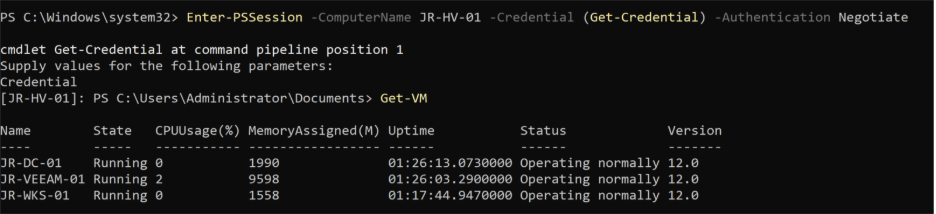
    Time to test if things were finally communicating. Here’s the kicker—you have to use the default local Administrator account, not just any local admin. That realization cost me a few unnecessary retries. The winning command: 

    Enter-PSSession -ComputerName JR-HV-01 -Credential (Get-Credential) -Authentication Negotiate 

    I logged in as the local admin, ran Get-VM, and at last—Veeam could see the guests! High hopes, back to the Veeam console, rescanned the host, and crossed my fingers. 

    And… still nothing. Turns out, even switching to the Administrator account credentials in Backup Infrastructure didn’t solve it. Every time I thought I’d cracked it, Veeam threw up another “nope.” 

    This produced an error, and while that’s not ideal, at least it gave me something to work with. My first thought was to just add the host to the domain and be done with it, but since this is a test environment, I wanted a cleaner fix. Thankfully, there’s a workaround—WinRM can actually be set up to allow communication across workgroup or non-domain devices. 

    To get this going, I opened PowerShell on the host and ran: 

    Enable-PSRemoting –Force 

    That was an easy win. Next, on the Veeam server, I needed to list the Hyper-V host as a trusted device: 

    Set-Item WSMan:\localhost\Client\TrustedHosts -Value “JR-HV-01” -Force 

    For the real test, I tried to remote in from the Veeam server. Heads-up: this only works if you use the default local Administrator account—not just any account with local admin rights (it took me more tries than I’ll admit to figure that out!): 

    Enter-PSSession -ComputerName JR-HV-01 -Credential (Get-Credential) -Authentication Negotiate 

    With the right credentials, I was able to run Get-VM and finally confirm that the server could see the guests. Back in Veeam, hope surged as I rescanned the host and switched credentials to the Administrator account… but, once again, nada. Even with all the right moves, Veeam still wouldn’t play ball. This homelab adventure wasn’t done with me yet! 

    At this point, we’d tested just about everything—and I started wondering if maybe some old configuration was still causing trouble. So, I did the classic “turn it off and on again,” giving the box a restart. Honestly, I wasn’t expecting much, and sure enough, it didn’t help. Now I was just staring at the Veeam console, fresh out of ideas and starting to dig into research. I even ended up troubleshooting live with ChatGPT. 

    Out of nowhere, something clicked. I thought back to managing replicas in enterprise environments—there’s always a dedicated section for Microsoft Hyper-V under Backup Infrastructure, where you see your host and its guest VMs grouped neatly. Here, none of that. That’s when I figured it was time to revisit the Veeam documentation. 

    And there it was: a crucial detail I’d missed. Before blowing everything away, I thought a reinstall might fix things, so I downloaded the latest ISO and, while it was chugging along, double-checked my Hyper-V tools on the Veeam server with: 

    Get-WindowsFeature *hyper* 

    Turns out, I was missing the Hyper-V management components. Fixing that was simple: 

    Install-WindowsFeature -Name RSAT-Hyper-V-Tools –IncludeAllSubFeature 

    Once Hyper-V tools finished up (and the ISO download was done), I reinstalled Veeam from scratch. But this time, I paid attention to every little detail in the wizard—and that’s where I saw the magic line: 

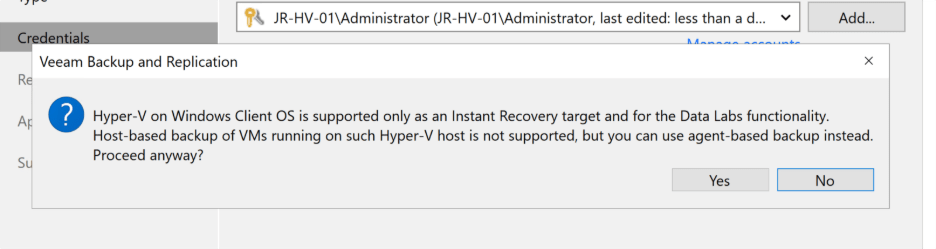
    “Hyper-V on Windows Client OS is supported only as an Instant Recovery target and for the Data Labs functionality. Host-based backup of VMs running on such Hyper-V host is not supported, but you can use agent-based backup instead.” 

    And there was my answer. If your Hyper-V host is running Windows 10/11 Home, Pro, or Enterprise, host-based VM backups simply won’t work. My lab runs on Windows 11 Pro—it’s my daily driver as well as my server. I was both relieved and frustrated to finally get the explanation! 

    So, where did that leave me? I had two choices: either upgrade my host to Windows Server OS (which felt like overkill for a machine that doubles as my daily driver), or go the Agent Based backup route. Easy decision—the agent method wins. 

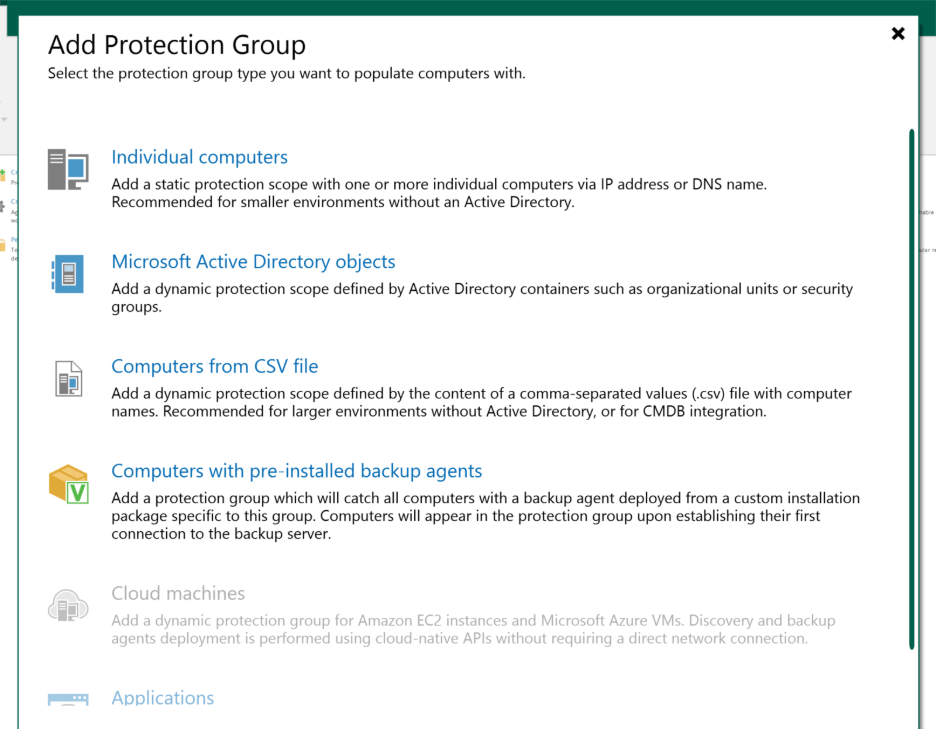
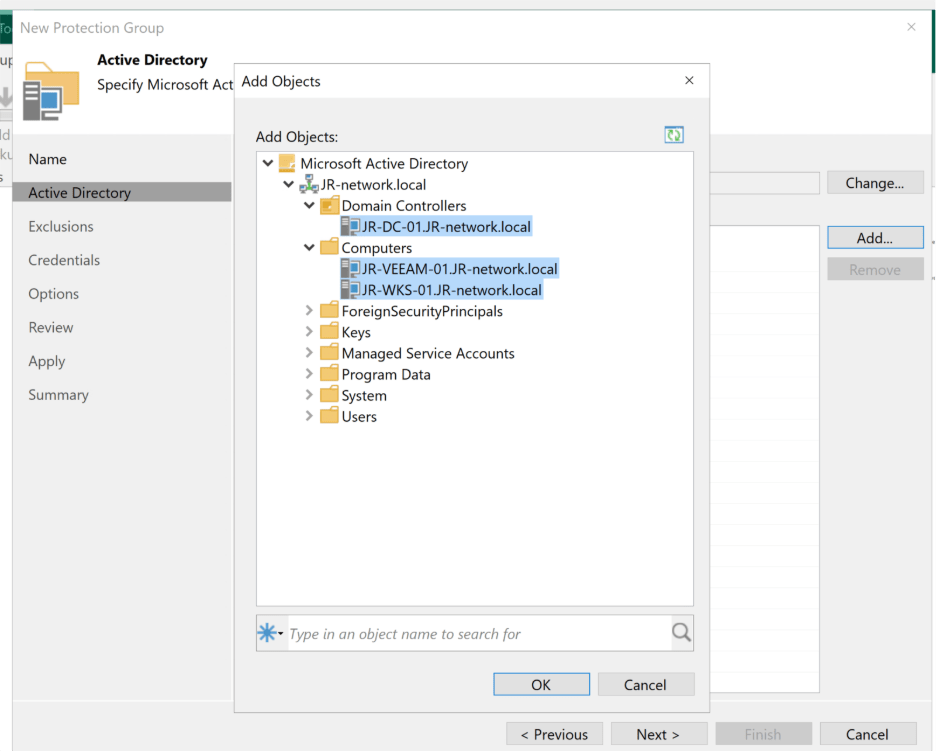
    This is where things start to look a little different. Instead of charging ahead with “New Backup,” I went over to Inventory and chose to Create New Protection Group. Since all my VMs play nicely together in the same domain, I went for the Microsoft Active Directory objects option. 

    The wizard guided me through naming the group and picking my domain, which let me see all my lab machines in one place. I selected every VM I wanted to protect and cleared out the default exclusions—don’t need anything hiding from me at backup time. 

    Next, I set it to use the domain Veeam Service account I’d already created, and tweaked the device discovery and agent deployment options. Because my homelab isn’t always online, I decided to have the discovery job run every hour. Maybe a little aggressive, but I’d rather be safe than sorry with my quirky lab uptime. 

    After a quick review, I hit Apply. The group was created, Veeam scanned the devices, and suddenly things were starting to look a lot more promising. 

    Now that the protection group was up and running, it was time for one of the most important pieces: actually picking where my precious backups should live. By default, Veeam wants to save files on the backup server itself—but I had other plans. I wanted my backups sitting pretty on a dedicated SSD in my host, not just anywhere. 

    Setting this up was straightforward. In the Veeam Console, I headed to Backup Infrastructure, selected “Backup Repositories,” and chose “Add Repository.” Since my VM is directly attached to the storage, I selected “Direct Attached Storage” and then “Windows.” From there, it was just a matter of giving my repository a name and making sure the server was set to JR-HV-01, not JR-VEEAM-01. 

    A couple more clicks and I pointed the storage location at my SSD for fast, reliable backup performance. The rest—such as the Mount Server settings—could stay at their defaults. The configuration only took a few minutes, and just like that, my shiny new repository was ready to roll. 

    Veeam prompted me to use this as the default backup location, and since this SSD is where I want all my backups living, I hit yes. On to the main event—setting up the backup job itself! 

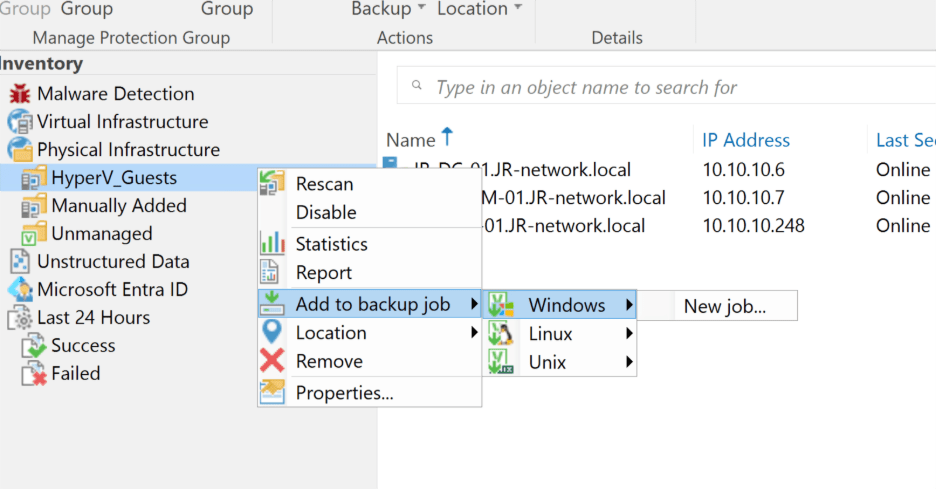
    At last, it was time for the main event—setting up the actual backup job. From the protection group I’d just built, I right-clicked, chose “Add to backup job,” selected “Windows,” and then “New Job.” This brought up the now incredibly familiar Veeam wizard. 

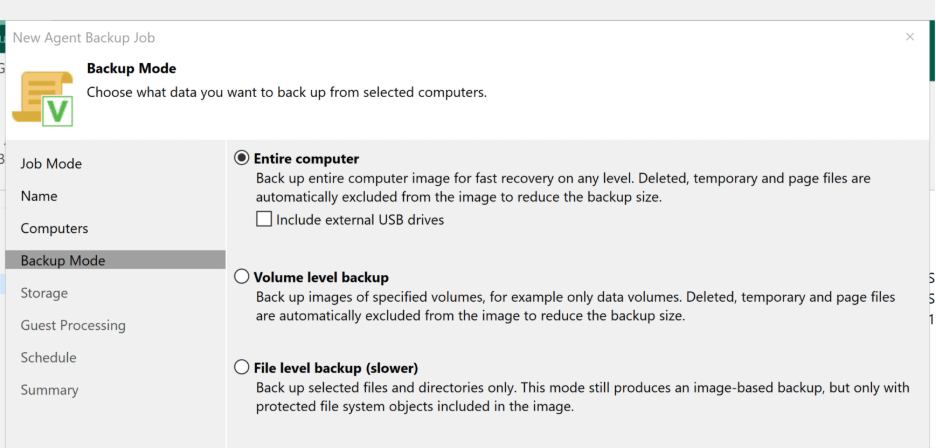
    Most of the job options could stay at their safe defaults—I wanted the Veeam Server to handle everything, so I left that set, gave the job a memorable name, and moved on. Since all the computers I wanted to back up were already picked thanks to the protection group, setting those up was a breeze. For max coverage (and peace of mind), I chose to back up the entire machine, not just selected files or volumes. 

    Next, it was time to point the job at the correct storage. I selected the new backup repository on the SSD, left the Guest Processing options untouched, and moved forward to scheduling. Normally, I’d opt for daily backups, but given my lab isn’t always powered on, I set the job to run every two hours instead. A little extra redundancy never hurt, right? 

    With everything ready, I hit apply and finish. But of course, you don’t trust a backup until you see it in action—so I headed back to the Veeam console, found my new job, right-clicked it, and selected “Run Active Full.” Then came the moment of truth: cross my fingers, wait it out… and yes! The backup job completed smoothly, no errors in sight. 

    Success tastes almost as good as that pack of biscuits! 

    And just like that, another homelab saga comes to an end! I’ll admit, this post ended up much longer than I’d planned—but honestly, that’s the beauty of tinkering in a lab environment. You get to stumble, experiment, and actually learn from the process (even if it involves a few extra cups of tea and a mild existential crisis over why things won’t work). 

    So, what did we learn this time around? 

    • Don’t underestimate the value of reading the documentation—especially when it comes to OS limitations! 
    • Network and firewall settings will trip you up more than you expect—always triple check them. 
    • Sometimes, starting over really is the best way to fix a sketchy setup. 
    • And if you’re running Hyper-V on a Windows 10/11 Pro machine, agent-based backups are the way to go. 

    Now, I’ve finally got Veeam backups configured, which gives me the perfect safety net as I launch into new and crazy experiments in the lab. Redundancy: achieved. 

    Thanks for following along with this adventure—and I hope you found the journey (and even the pitfalls) helpful! If you prefer a more streamlined “just the method, no misadventures” style for these posts, or if you actually liked seeing all the real-life troubleshooting and mistakes, let me know in the comments! 

  • When AI Was Just Sci-Fi: My Thoughts on Artificial Intelligence 

    When AI Was Just Sci-Fi: My Thoughts on Artificial Intelligence 

    Ever catch yourself chatting with your phone or asking your computer for help and realize, just for a second, that you’re living in what used to be science fiction? That’s exactly how I feel about artificial intelligence these days. Not too long ago, AI was the stuff of movies and video games—Cortana guiding you through alien worlds in Halo, or Jarvis coolly managing Tony Stark’s high-tech life in Iron Man. Back then, having a digital assistant like that seemed about as likely as owning a flying car.

    Fast forward to now, and I find myself using AI almost every day—sometimes without even thinking about it. Whether it’s organizing my work, brainstorming ideas, or just making sense of a messy spreadsheet, AI has quietly slipped into the background of my daily routine. It’s remarkable how quickly this once far-off fantasy is becoming part of our reality. In this post, I want to share how my own relationship with AI has grown, the excitement (and worries) it brings, and why I think we’re only seeing the beginning of its impact on our lives.

    From Sci-Fi Fantasy to Daily Reality 

    rowing up playing games, I always loved the idea of having an AI assistant. It was one of those “maybe one day” kinds of fantasies, and honestly, I never truly expected to see anything close to that in my lifetime. Yet here we are—while a Jarvis-level assistant isn’t quite in reach just yet, it’s becoming less outlandish with every passing year. 

    I remember the first time I realized AI was actually starting to materialize. I was in the pub, catching up with an old colleague over lunch. We were chatting about work, when he suddenly asked if I’d heard of OpenAI. I hadn’t. He started describing it as this revolutionary tool that was massively improving the way he wrote documentation and scripts at work. That conversation was the spark for me to start digging into what all the hype was about—and boy has it changed things for me. 

    AI in My Daily Life 

    Since January 2023, AI has steadily woven itself into my daily routines. I’ve used ChatGPT both professionally and personally. At work, it’s become a bit like my invisible teammate when I’m writing documentation, drafting new processes, technical troubleshooting, or even generating scripts. My workflow usually goes something like this: I jot down rough notes on how I want a process to look, ask ChatGPT to peer review and suggest improvements, and then get it to help format the information so it’s clear and polished. Of course, there are always the finishing touches that need a human eye—details and context that only make sense to me or my team—but AI’s become an invaluable partner in the groundwork. 

    Outside of work, I’ve let my curiosity lead me into other AI rabbit holes. I spent some time experimenting with image generation using Stable Diffusion, and I turn to AI for everything from creative writing help to technical troubleshooting at home. If I’m wrestling with a clunky sentence in a blog post, or need a second opinion on a storyline, AI is there to nudge me in the right direction or format things more cleanly. Towards the end of 2024, I started using Microsoft CoPilot for work too, and I’m now tinkering with the idea of hosting my own AI using Mistral. Yes—this stuff is addicting. 

    What Excites Me About AI 

    As someone who used to daydream about digital assistants, the idea of someday having my own totally unique, customizable, emotionally intelligent AI is both wild and thrilling. Imagine an assistant that not only understands your schedule and preferences, but can also pick up on your moods, respond with empathy, and feel truly like a partner rather than just an app.

    But even now, with the tools already available, I’ve found AI genuinely exciting because of how much more productive and efficient it’s made me. Take documentation, for example—something that can quickly eat up hours. With AI, I can draft, peer review, and format processes in a fraction of the time. It’s like having a built-in co-writer who’s always available to bounce ideas off or tidy up my rough thoughts. The same goes for data manipulation: when I’ve got messy raw data in a spreadsheet, I can simply hand it to AI and ask for a cleaner, more organized version. Sure, it’s not infallible—I always double-check the results, because sometimes it’ll make small mistakes or misinterpret my intent—but for the most part, it shaves off so much manual effort. 

    AI has also upped my game in terms of automation. Creating efficient automation flows has become easier, as AI helps brainstorm, optimize, and sometimes even generate the scripts or workflows I need. That level of support really opens up more time and brainpower for the work that calls for genuine creativity or problem-solving. 

    Another plus? Reducing human error. When I’m knee-deep in repetitive or detail-heavy tasks, it’s easy to slip up or overlook something. Automating those steps with AI not only speeds things up, but also brings a welcome level of consistency and reliability—provided, of course, I’m still validating what comes out the other end. 

    And of course, on a bigger scale, I’m excited about the progress AI can usher in for science and technology. Whether that’s accelerating medical breakthroughs, driving new discoveries, or simply helping society tackle complex challenges, the potential is huge. It’s not just about working faster—it’s about working smarter, more accurately, and perhaps finding solutions we’d never have come up with on our own. 

    The Flip Side: My Concerns

    Of course, it’s not all sunshine. Using AI in a professional environment isn’t risk-free—you can’t just dump sensitive business or personal information in and expect it to be secure. It takes proper training and a healthy amount of caution, especially when using AI for technical troubleshooting or creative processes. 

    Then there’s the question of the job market. If AI really can automate away certain types of work, what does that mean for jobs, and how will it affect the broader economy? The possibility of fewer traditional jobs, transformed workplaces, or entire industries changing overnight is both intriguing and worrying. 

    Socialisation is another area that gives me pause. If AI becomes so good at conversation and companionship, will people start to drift away from connecting in person? What does it mean for human relationships if we can get emotional fulfillment from something synthetic? 

    And of course there’s misinformation. Large language models like ChatGPT learn by absorbing huge swathes of internet data—good, bad, and ugly. If they ingest enough biased or incorrect information, there’s a real risk of perpetuating or amplifying those errors. Plus, with any system that’s open-ended, the chances of generating inappropriate, adult, or even illegal content are never zero without careful oversight. 

    Pop Culture AI vs. The Real Thing 

    I think pop culture has done a good job of making us both excited and terrified about AI. Hollywood loves to dramatize artificial intelligence—think Avengers: Age of Ultron or Terminator 2—where AI is either saving the world (or, more often, threatening to destroy it). These extremes make for great movies, but reality is a lot subtler. Instead of robots taking over the planet, we’re dealing with AI in our phones, on websites, as chatbots, and customer service reps. It’s seamlessly blending into our digital environment, often making things easier… with the occasional weird suggestion or hilarious misunderstanding. 

    My Stance

    AI. The next big thing. These days, I can’t scroll through my feed without seeing it pop up—sometimes with excitement, but more often with anxiety or alarm. Personally, I think it’s important to see the bigger picture. AI isn’t inherently good or bad; it’s a tool with massive potential for both benefit and harm, and it’s up to us to shape the way it develops. For now, I’m optimistic and curious—using AI daily, learning the ropes, and keeping a wary eye on the risks. 

    Personally, I don’t think it’s a bad thing—yet. 

    But that’s just where I am right now. I’d love to hear your thoughts: How do you use AI? Are you hopeful, worried, or maybe both? Let me know what you think in the comments

  • Configuring a New Domain for the Homelab

    Configuring a New Domain for the Homelab

    If you spend any time lurking in homelab forums like r/homelab, you’ll see one piece of advice come up over and over: set up your own Active Directory domain as soon as possible. A domain controller gives you centralized account management, lets you enforce policies and settings across devices, and is a launchpad for way more advanced IT projects down the line. Honestly, it’s like the backbone of a real enterprise network, just shrunk down to fit in the spare room.

    Truthfully, it’s something I should have done right after turning my old gaming rig into my first server. But, at the time, I just wanted to tinker with whatever caught my interest—I didn’t have a plan. Even though I work with Windows Server all day, I’d never walked through the full domain controller setup on my own from scratch. The closest I’d come was poking around with the Certificate Authority role, mostly by blindly following a how-to!

    So, today was finally the day. I put on my “ITIL brain” (yes, it haunts me even at home), spent a few hours researching and documenting each step so Future Me can fix whatever I break, and sat down to spin up a shiny new virtual environment. My plan was simple: deploy a Windows Server 2022 domain controller, create an external virtual switch so it could actually talk to other devices, set up a Windows 11 Pro workstation to test future GPOs (and break things safely), and prep my trusty Veeam server to join the new domain. This post is more of a behind-the-scenes walkthrough than a step-by-step guide—but don’t worry, I’ll link to my documentation at the end for anyone who wants to try it out.

    Getting Set Up: ISOs and Virtual Switches

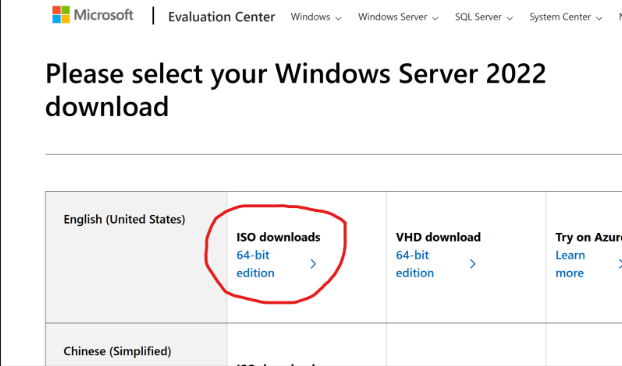
    First up: downloading the tools. Microsoft makes it easy—just hop onto their Evaluation Center, grab the Windows Server 2022 ISO, and you’re good for 180 days (or up to 1080 days if you get creative with re-arms). Luckily, I already had a Windows 11 ISO on hand, but for anyone who doesn’t, here’s the official link.

    Windows Server 2022 Evaluation ISO – Can be downloaded from here

    While the server ISO downloaded, I headed into Hyper-V Manager to set up a new external virtual switch—essential for letting the VMs talk to other devices across my network. With the switch prepped, the ISO finished up just in time for the next phase: creating the actual domain controller VM. I gave it a minimal but adequate spec (4GB RAM, 60GB disk), knowing I can always bump things up if I need to down the road.

    While the server ISO downloaded, I headed into Hyper-V Manager to set up a new external virtual switch—essential for letting the VMs talk to other devices across my network. With the switch prepped, the ISO finished up just in time for the next phase: creating the actual domain controller VM. I gave it a minimal but adequate spec (4GB RAM, 60GB disk), knowing I can always bump things up if I need to down the road.

    Installing Windows Server and Basic Setup 

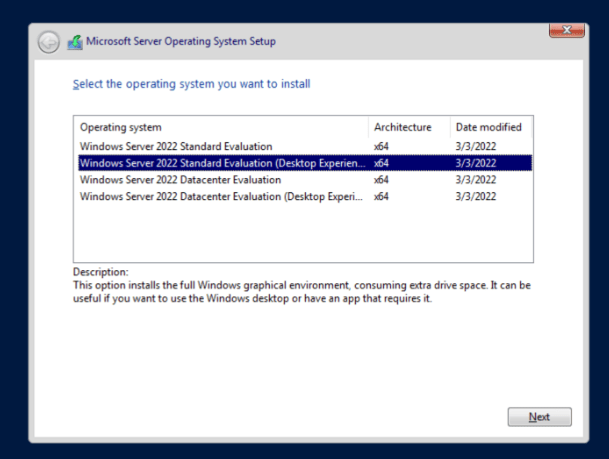
    Watching JR-DC-01 pop up in Hyper-V was weirdly satisfying. I fired it up and started the server install, making sure to select the “Desktop Experience” option—no command-line only installs for me this time! After a quick custom install on my fresh disk, Windows Server was running in just a few minutes.

    From here it was all about the admin basics: creating a strong password, running updates (which took forever—thanks, Microsoft!), and then popping into my firewall to check which IPs were free outside my DHCP pool. Once the server was up to date, I set a static IP so everything on my network stays predictable. 

    Adding the AD DS Role and Promoting to Domain Controller

    With my new admin account set up and Windows fully updated (why do server updates always take so long?), I got ready to configure the server’s static IP. A quick check of my firewall showed which addresses were free outside the DHCP pool, so I set up a neat static IP for the new domain controller—no surprises with DHCP changes down the road.

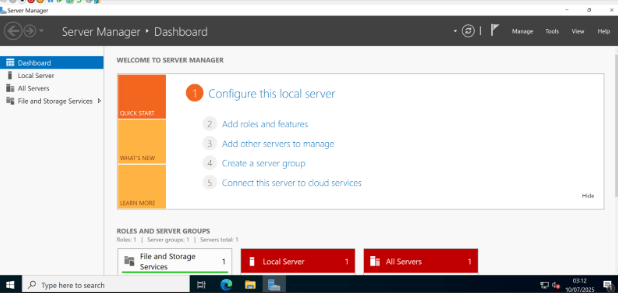
    With networking sorted, I dove into Server Manager to tackle Active Directory. Installing the AD DS (Active Directory Domain Services) role turned out to be refreshingly simple: just click on “Manage,” choose “Add Roles and Features,” and select Active Directory Domain Services from the list. During the prerequisite screen, I deliberately left the DNS Server role unchecked—my UniFi firewall already handles DNS and I figured, why make things more complicated? (Spoiler alert: More on that later!) The installation zipped by in less than a minute.

    Next up was promoting the server to a domain controller, the real heart of this whole exercise. The wizard was straightforward: I selected “add a new forest,” plugged in jr-network.local as my root domain name. After a few prerequisite checks, I hit “Install” and let Windows do its thing. After a quick reboot, I saw that familiar domain sign-in screen pop up. That first log-in with your shiny domain admin credentials feels pretty great—domain admin power, officially unlocked.

    Setting Up the Testing Workstation 

    With the domain controller sorted, it was time to spin up a guinea pig: a Windows 11 Pro VM (4GB RAM, 64GB disk), with TPM enabled to make Windows 11 happy. The install was mostly straightforward, but here’s where I hit my first snag: Microsoft really, really wants you to use a Microsoft Account, opt in to every privacy setting (ironic), and subscribe to Game Pass and Office 365 along the way. I pressed “skip” so many times I started to think Skynet was judging me. 

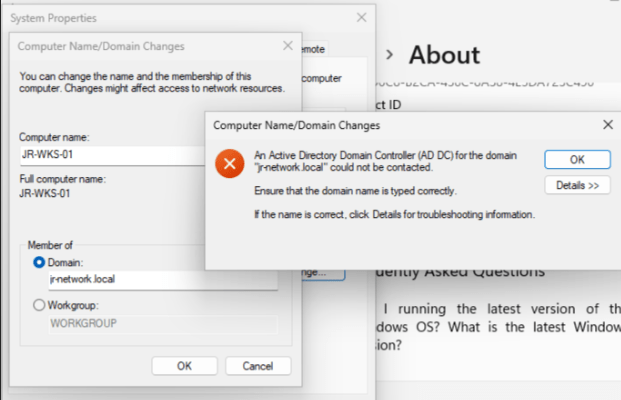
    A small slip-up had me accidentally set up the device as “home,” but after sorting that, I logged into Windows and set about joining the workstation to my shiny new domain—until, of course, I ran smack into an error. Despite double-checking the spelling, network, and connectivity (all fine), it just wouldn’t join. 

    Oops, You Really Do Need DNS… 

    Classic learning moment: turns out, AD domain joins rely on DNS, and I’d skipped installing the DNS Role on the DC. Time for a quick detour—back to Server Manager, enable the DNS Server role, fast-forward through setup, and voilà: DNS was operational. After a DC reboot, domain join worked first time. Gotta love it when a fix is that clean. 

    The Not-So-Simple Part: The Veeam Server Saga 

    With my domain and test workstation finally communicating happily, I turned my attention to reconfiguring JR-VEEAM-01 to join the domain… only to find it was powered off and refusing to start. Because of course it was. I opened up the console and, instead of a login screen, got hit with a fresh error. Homelabbing, am I right? If you ever think everything’s going to go smoothly, the universe sends you a quick reminder. 

    Instead of squeezing that fix into this (already long) post, I’ve decided to save the Veeam adventure for next time. That’ll include troubleshooting whatever is going on, getting it attached to the domain, and setting up proper backup jobs for both the new domain controller and workstation. 

    Lessons Learned & The Road Ahead

    Today, I managed to get a domain controller up and running, deploy Active Directory Domain Services and DNS, and prove out the basics of account and policy management on a test workstation. Even with a few detours, it’s been a solid step forward—and proof that you don’t need a complicated lab to learn real enterprise skills.

    If you’ve read this far, thanks for sharing in my victories (and commiserating in my “facepalm” moments). I hope this gives you the confidence to try setting up your own domain, or at least assures you that bumps along the way are all part of the process. If you want a copy of my detailed documentation or want to see a deep-dive on any step, let me know in the comments!

  • My Current Homelab Setup—and Where I’m Headed Next 

    My Current Homelab Setup—and Where I’m Headed Next 

    Over the past couple of months, I decided it was time to give my old gaming PC a new purpose. These days, I rarely find time to game, so I’ve been looking for ways to get hands-on with something fresh—enter the world of self-hosting. With so much tech shifting to the cloud, I’m eager to see how much I can do on my own, just for the sheer challenge and the chance to learn something new. Of course, the added perk of keeping more control over my own data doesn’t hurt (and no, I’m not a tinfoil hat conspiracy theorist!). For me, it’s about getting curious, gaining new skills, and taking a bit more ownership in an increasingly invasive digital world. 

    The Setup So Far

    Right now, my homelab setup is simple but solid—a great foundation to build on. One of my first moves was ditching the default ISP router for a UniFi networking stack, mainly so I could finally create multiple VLANs and take advantage of built-in IDS/IPS security features. My network now consists of a UniFi Gateway Max, an 8-port Ultra 60W PoE switch, and two U6+ access points, which gives me robust wireless coverage and dedicated networks for personal devices, IoT gadgets, and guests. Everything feels so much more organized—and a lot more secure—since making the switch. 

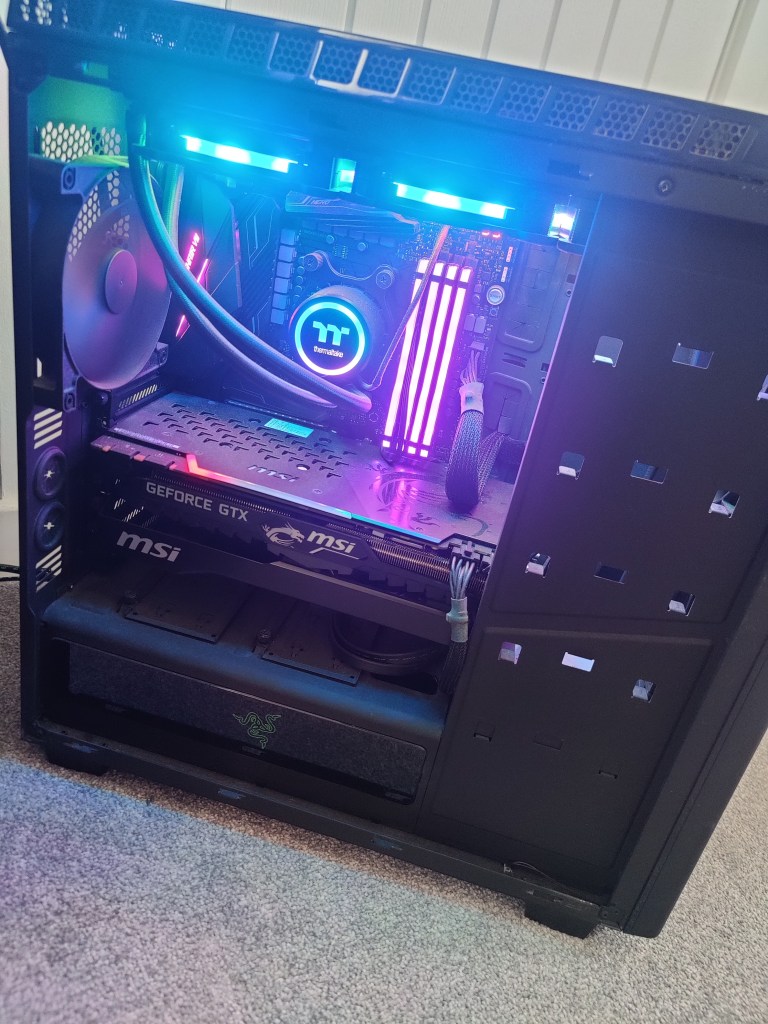
    At the heart of my platform is a repurposed gaming PC, now doing duty as a Hyper-V server. It’s powered by an 8-core Ryzen 7 2700X, 32GB of RAM, a GTX 1080ti, and about 1.75TB of storage cobbled together from a 500GB NVMe SSD, a 1TB and a 500GB SATA SSD, plus a 1TB HDD. At the moment, it’s mainly running a single VM for Veeam backups, leaving me with plenty of room (and plans) for launching new projects. Alongside that, I’ve got a Home Assistant Green running my smart devices, and a Raspberry Pi 2 Model B that’s been collecting dust—just waiting for me to get more hands-on with Linux in the near future. 

    Where I’m Headed Next: Big Plans and New Experiments

    So, where does all this leave me? In short, I want to see just how much I can self-host—and how far I can push my Home Assistant setup. There’s something rewarding about having full control and actually building out the digital tools I use every day. 

    Here’s what’s on my list: 

    • Build and configure a NAS: I’m aiming to create a reliable, expandable storage solution for all my files, backups, and media.
    • Self-host my own cloud storage: Tools like NextCloud and Seafile are at the top of my list for keeping my documents, photos, and calendar in sync—without relying on the big clouds.  
    • Migrate my password manager: I’d like to move everything over to a self-hosted Bitwarden instance. 
    • Set up Plex or Jellyfin: Centralized media storage: each has its pros and cons and I’m not set on what one I’ll go with, but its high up on the list of priorties 
    • Create a VPN: Secure remote access (and the ability to safely share content with friends and family) is a must-have. 
    • Host my own website & try running an AI model: I want to try hosting my own site—and maybe experiment with my own locally hosted AI model 
    • Run my own email server 

    Home Automation

    My basic Home Assistant Dashboard – Out of the box with the Tuya integration configured for managing lights and aircon

    My interest in home automation has really taken off since discovering Home Assistant. Right now, I’ve got a growing pile of smart devices scattered around my house, each with its own app and login. One of the best things about Home Assistant is finally being able to control everything from a single dashboard—no more toggling between a dozen apps just to turn off the lights and lock the door. The platform’s flexibility is wild; I can even pull data from my car, and the potential for custom dashboards and automations is almost endless. 

    I’ve only just dipped a toe into this world, and so far I’ve got the integrations setup for my smart bulbs and air con unit. I’ve repurposed an old Galaxy Tab A that I’m using as a dedicated dashboard to manage these for the time being as a bit of a proof of concept. Once I’ve got a stable platform with more integrations setup, and had made some progress on a custom dashboard then I’ll look to upgrade this to something a bit more sleek. I’d like to get one for each floor too and have them wall mounted with either magnetic wireless chargers, or wired in if I can’t get that to work.

    The Ultimate Smart Dashboard

    One of my big goals is to design and build a dashboard that puts everything I care about front and center—true “mission control” for my home. Here’s what I want it to show and do:

    • Live electric, gas, and water usage, with clear graphs 
    • Family calendar and running to-do list 
    • Weather forecasts and advance commute times (based on our phones’ locations) 
    • Controls for lighting, music, and smart speakers everywhere in the house 
    • Real-time feeds from my CCTV cameras 

    Building the Perfect Setup

    My future plans include building a tidy rack to house all my networking gear, the NAS, and my Home Assistant Green—with room for a small display screen to monitor performance metrics in real time. On top of that, I’m planning a big “smart migration” for my house: upgrading to a smart meter, switching over to smart heating, and replacing all the lighting with gear that seamlessly integrates with Home Assistant. And, for a bit of fun, I’m also interested in building a magic mirror—something that would display the weather, calendar, and news while I brush my teeth. 

    As I work through these upgrades and projects, I’ll be documenting each step, sharing what I learn, and inviting you along for the ride. There’s plenty to build, break, and (hopefully) improve—so if you’re into homelabs, tech, or just enjoy a good experiment, stay tuned!